MD5 Checksum Calculator
MD5 Checksum Calculator, formerly known as RiMD5, is a small portable Windows utility from Rizone Technologies that calculates MD5 hash values for files. It can be used to compare a file against a checksum supplied by a developer or to check whether a file changed during transfer or storage. The final listed version is 0.0.5.58, and the program supports MD5 only.
MD5 Checksum Calculator: Verify File Integrity
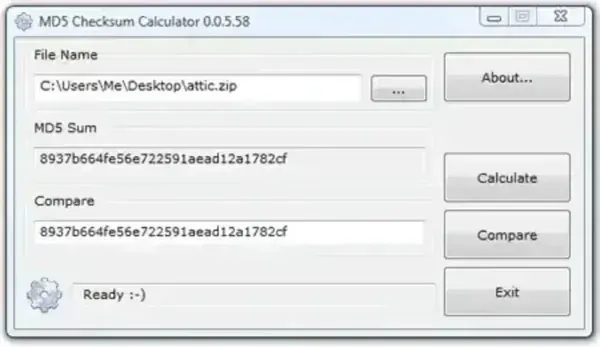
A checksum is a value calculated from the contents of a file. If even a small part of the file changes, its hash value will normally change as well. MD5 Checksum Calculator provides a simple way to calculate an MD5 digest and compare it with a value published by a software developer or another trusted source.
This can help detect accidental corruption during a download or file transfer. It is important to distinguish this from cryptographic security: MD5 has known collision weaknesses and should not be used to prove that a file is authentic or resistant to deliberate tampering. When a publisher provides SHA-256, use that stronger hash instead.
What the Utility Can Do
- Calculate MD5 hashes: Generate an MD5 digest from a selected file.
- Compare checksums: Check whether the calculated value matches a checksum you already have.
- Verify downloads: Detect many accidental file changes when comparing against a trusted published MD5 value.
- Portable operation: Run the small executable from a folder or USB drive without a conventional installation.
- Simple interface: Calculate and compare a file hash without using command-line tools.
How to Check a File
- Download the ZIP package and extract it to a folder.
- Run the MD5 Checksum Calculator executable.
- Select the file you want to check and start the calculation.
- Copy the generated MD5 value and compare it with the checksum published by the file's original developer.
- If the values do not match, download the file again from the official source and investigate before opening it.
For a modern SHA-256 check, Windows also includes the PowerShell Get-FileHash command. For example:
Get-FileHash "C:\path\to\file.zip" -Algorithm SHA256
Compare the output with the publisher's SHA-256 value. A hash comparison is only meaningful when the reference checksum comes from a trusted source, ideally over a separate authenticated channel.
MD5 Checksum Calculator Specifications
- Application: MD5 Checksum Calculator (formerly RiMD5)
- Version: 0.0.5.58
- Developer: Rizone Technologies
- License: Freeware
- Platform: Windows; current compatibility is not documented by the original project
- Hash algorithm: MD5 (128-bit)
- File size: Approximately 371 KB for the archived ZIP package
- Main features: Calculate and compare MD5 file hashes
- Deployment: Portable ZIP package; no installation required
- Development status: Legacy utility; no recent release activity identified
- Editor's Rating: ★★★★☆ (4/5)
- Download: Download the archived MD5 Checksum Calculator ZIP package
- SHA-256 of the archived ZIP:
8fee6e29efc77c4e1a714f001a34d2b21bb2d45c12501e8fa0f13799ed1a9fe4
MD5 Is Not Suitable for Security-Critical Verification
MD5 is still useful for identifying many accidental changes, but attackers can deliberately create different files with the same MD5 hash. Do not use MD5 as the sole check for software authenticity, digital signatures, or security-sensitive downloads. Prefer SHA-256 or a publisher-provided digital signature for those tasks.
Is MD5 Checksum Calculator Still Useful?
MD5 Checksum Calculator remains a simple portable option for checking legacy MD5 values, especially when working with older downloads or archives. Its limitation is that it supports only an outdated hash algorithm and has not been updated recently. For new software downloads, use a current hash utility or Windows PowerShell's built-in SHA-256 support instead.