Duplicate Music Files Finder
Duplicate Music Files Finder is a free utility created by Lancuta Liviu Timotei that helps locate and remove duplicate music files. It can scan for duplicate MP3, WAV, and WMA audio files, making it useful for cleaning up music collections stored on a computer, USB flash drive, or other attached storage device.
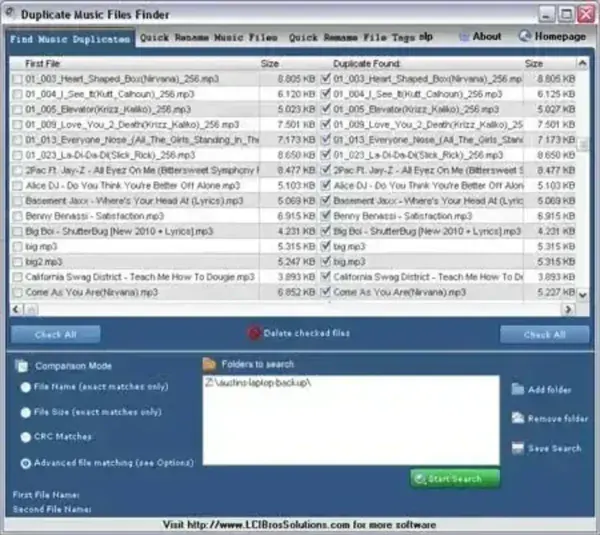
When duplicate tracks are detected, the program displays the first music file found in the left pane and its matching duplicates in the right pane. This side-by-side organization makes it easier to identify duplicate entries and select the unwanted copies for removal.
Checkboxes and Check All buttons are available in both panes, allowing you to select individual files or multiple duplicates at once. This provides a convenient way to review and manage duplicate music files without manually searching through folders.
Duplicate Music Files Finder - Detect Duplicate MP3 Files
Duplicate Music Files Finder provides a simple approach to finding duplicate audio files that may have accumulated across a music collection.
If you regularly copy music between computers, external drives, and USB flash drives, it is possible to end up with multiple copies of the same tracks. These duplicates can consume valuable storage space and make music libraries harder to organize.
Instead of manually comparing filenames and browsing through folders, you can use Duplicate Music Files Finder to identify matching audio files and review the results in its two-pane interface.
Find Duplicate MP3, WAV, and WMA Files
Duplicate Music Files Finder supports three common audio formats:
- MP3: A widely used compressed audio format commonly found in digital music collections.
- WAV: An audio file format frequently used for uncompressed or lossless audio storage.
- WMA: Microsoft's Windows Media Audio format.
By focusing on these formats, the utility can help identify duplicate music files across collections containing different types of audio recordings.
This can be particularly useful when organizing older music libraries or consolidating tracks stored across multiple directories.
Two-Pane Duplicate Music File Comparison
One of the more useful aspects of Duplicate Music Files Finder is its straightforward two-pane layout.
The first occurrence of a music file is displayed in the left pane. When the program detects duplicates, those additional copies are displayed in the right pane.
This arrangement makes it easier to distinguish the original listing from its duplicate entries and decide which copies should be kept.
The interface also includes selection checkboxes and Check All buttons on both sides. You can select individual files for removal or use the selection controls to mark multiple entries at once.
Before deleting anything, review the selected files carefully. If duplicate copies are stored in different folders, make sure you understand which locations will be affected.
Clean Up Duplicate Songs and Reclaim Disk Space
Duplicate music files can accumulate over time, particularly when transferring music between computers, backing up collections, or copying tracks to removable storage.
For example, a music folder might contain several copies of the same MP3 track because it was imported more than once or copied from another device.
Finding and removing unnecessary copies can help:
- Reduce wasted storage space on USB flash drives and external hard drives.
- Organize music collections containing repeated tracks.
- Identify duplicate MP3, WAV, and WMA files.
- Reduce clutter when browsing large music directories.
- Make it easier to maintain a consolidated music library.
For best results, review the duplicate listings before removing files. Two recordings can have similar names without being identical, and different audio encodings or versions of a song may be worth keeping.
It is also a good idea to maintain a backup of music files that would be difficult to replace.
Using Duplicate Music Files Finder with Portable Storage
Duplicate Music Files Finder can be useful when organizing music collections stored on removable media, including USB flash drives and external hard drives.
For example, if you regularly transfer music between devices, you may have accumulated duplicate tracks across several folders. Scanning the collection can help identify these copies and make it easier to decide which files to retain.
Removing unnecessary duplicates can also free up space for additional music, documents, and other files.
Duplicate Music Files Finder Review
Duplicate Music Files Finder is a straightforward freeware utility for locating duplicate audio files. Its support for MP3, WAV, and WMA files covers several commonly encountered music formats, while its two-pane interface makes reviewing duplicate listings relatively simple.
The checkbox selection controls are particularly convenient when dealing with multiple duplicate entries.
However, this is an older utility, and its original developer website is no longer presented as a current software destination. The archived developer page is provided below for historical reference. Compatibility with current Windows releases and the availability of the original download should be verified before relying on the program.
For users maintaining older music collections or looking for a lightweight duplicate audio file utility, Duplicate Music Files Finder is worth examining.
Download Duplicate Music Files Finder
Author: Lancuta Liviu Timotei
Author's Website: Archived Developer Website
Editor Rating: 3 Star
Extracted Size: 660 KB
License: Freeware
Download: Duplicate Music Files Finder Download
The download link is the original URL supplied with this review. Its current availability and file integrity have not been independently verified.
Frequently Asked Questions
What is Duplicate Music Files Finder?
Duplicate Music Files Finder is a freeware utility by Lancuta Liviu Timotei designed to locate and remove duplicate MP3, WAV, and WMA audio files.
Which audio formats does Duplicate Music Files Finder support?
The program supports MP3, WAV, and WMA audio files.
How does Duplicate Music Files Finder display duplicates?
The first music file found appears in the left pane, while detected duplicate files are displayed in the right pane. This makes it easier to review and select duplicate entries.
Can I select multiple duplicate music files at once?
Yes. The program includes checkboxes and Check All buttons on both sides of its interface, allowing you to select individual files or multiple entries.
Can Duplicate Music Files Finder help free up storage space?
Yes. By identifying unnecessary copies of MP3, WAV, and WMA files, the program can help you locate music files that may be removed to reclaim storage space.
Is Duplicate Music Files Finder free?
Yes. The utility is listed as freeware. However, its original developer website and download are historical links, so current availability should be checked before downloading.
For more tools to organize, browse, and manage files on your computer and removable storage devices, visit our File Managers category.