DTaskManager: Portable Windows Task Manager with Advanced Process Controls
DTaskManager is a Windows task manager by Dimio that adds process controls beyond the standard Task Manager. It can select and terminate multiple processes, suspend and resume processes, and use several methods to close a process. A PortableApps.com edition is available, making it possible to carry the utility on a USB drive. The portable package is maintained separately from the original standalone release.
Manage and Suspend Windows Processes
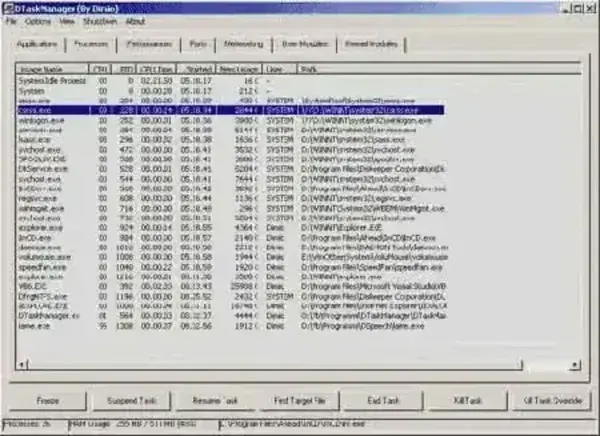
DTaskManager provides three process-termination methods: a normal termination request, a forced termination that allows dialog handling, and a more forceful method that can bypass permissions and terminate system processes. It can also suspend and reactivate a process, which may be useful when you need to pause a resource-intensive task without closing it.
The ability to terminate multiple processes at once can save time, but the strongest termination method is potentially disruptive. Ending a system process may cause Windows instability, data loss, or an immediate shutdown. Confirm the process name and purpose before acting, and avoid using forced termination on unfamiliar Windows components.
When Suspending a Process Helps
Suspending a process temporarily stops its threads without closing the application. This can be useful when troubleshooting a program that is consuming resources or when you need to pause a task briefly. It is not a substitute for closing the application normally, and a suspended process may hold files, memory, or other resources until it is resumed or terminated.
Do not suspend security software, Windows services, system processes, or applications that are performing important writes unless you understand the consequences. If a program is frozen, first try its normal close command and use Task Manager or DTaskManager only when you know what process is involved.
Portable Edition and Compatibility
PortableApps.com packages DTaskManager 1.57.32 in its portable application format. The package is listed for Windows XP, Vista, 7, 8, 10, and 11 and can be run from a USB drive or through the PortableApps Platform. The original developer's site lists the standalone application for older Windows versions, while the PortableApps package includes its own launcher and settings handling.
DTaskManager Specifications
- Developer: Dimio
- PortableApps package: 1.57.32
- Last listed PortableApps update: October 3, 2025
- License: Freeware for personal and business use
- Platform: Windows XP through Windows 11 (PortableApps listing)
- Main features: Multi-process termination, process suspension and resume, several termination methods, portable launcher
- Deployment: PortableApps.com package
- Editor's Rating: ★★★★☆ (4/5)
- Download: Get the portable package from PortableApps.com
Is DTaskManager Worth Using?
DTaskManager adds useful process controls for experienced users, particularly the ability to suspend a process and manage several tasks together. Its forceful termination options can also cause problems if used carelessly. It is best suited to technicians and advanced users who understand Windows processes and can identify which tasks are safe to stop. For routine process management, the built-in Windows Task Manager remains the safer starting point.