
QEMU Manager is a lightweight, portable graphical front end for the QEMU emulator that allows users to create, configure, and run virtual machines without relying on complex command line options. Designed for simplicity and portability, this utility makes working with virtualized operating systems more accessible for developers, IT professionals, and advanced users.
Because it can run directly from a USB flash drive, QEMU Manager is especially useful for creating and managing portable virtual machines that can be carried between systems.
Portable QEMU Manager for Virtual Machines
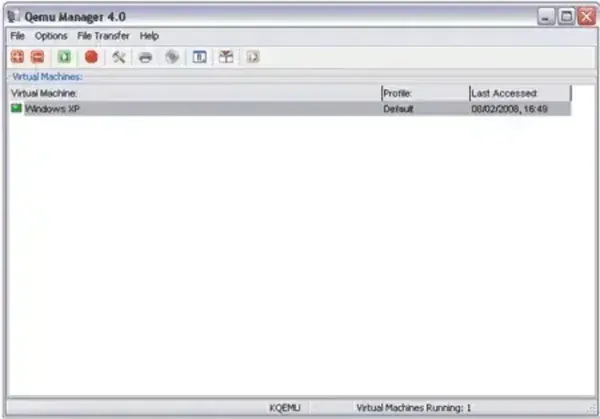
Portable QEMU Manager requires approximately 17 MB of disk space and does not need to be installed on the host system. Once extracted, it can be launched directly from removable media, making it a convenient solution for testing operating systems or maintaining virtual environments on the go.
What Is QEMU Manager?
QEMU Manager is a graphical user interface built to simplify the use of the QEMU emulator on Windows. Instead of manually entering command line arguments, users can configure virtual machines through a visual interface that handles CPU allocation, memory sizing, disk images, and boot options.
The software allows users to create virtual machine images, launch them with customized settings, and manage multiple virtual machines from a single interface.
Key Features
- Portable Execution: Runs directly from a USB drive without installation
- Graphical Interface: Eliminates the need for QEMU command line usage
- Resource Configuration: Adjust CPU, RAM, and disk parameters per virtual machine
- Multiple OS Support: Create and manage virtual machines for different operating systems
- Lightweight Footprint: Requires only about 17 MB of storage space
Use Cases
QEMU Manager was commonly used for:
- Testing operating systems in a virtual environment
- Running experimental or legacy OS builds
- Creating portable virtual machines for demonstrations or diagnostics
- Learning virtualization concepts without complex setup
Legacy Status and Limitations
Important: QEMU Manager is now considered an unsupported legacy application. Development has been discontinued for many years, and the software has not been updated to support newer versions of QEMU or modern hardware acceleration features.
While QEMU itself remains actively developed and widely used, this graphical front end lacks:
- Support for modern QEMU features
- Security updates
- Optimizations for current CPUs and virtualization extensions
As a result, QEMU Manager is best suited for educational purposes, legacy systems, or experimentation with older QEMU builds rather than production environments.
Specifications | Official Site | Where to Download
- Developer: David T. Reynolds
- Author Website: Archived Project Page
- Extracted Size: Approximately 17 MB
- License: Open Source
- Supported OS: Windows
- Portable: Yes
- Rating: 4 Star
- Downloading: QEMU Manager Download (Archived)
Final Thoughts
QEMU Manager was once a practical solution for managing portable virtual machines during its active development years. Although it is no longer maintained, I feel it can still be useful for users working with older systems or learning how QEMU based virtualization works in a simplified environment.
For modern virtualization needs, actively supported tools such as VirtualBox, VMware, or direct QEMU command line usage are recommended. However, for legacy experimentation or portable VM management, QEMU Manager remains an interesting and lightweight option worth preserving on a USB toolkit.
