
Undelete Plus is a Windows file-recovery utility from TouchStoneSoftware that scans storage devices for files that may still be recoverable after deletion. The official website currently lists version 4.0.23.823 and Windows 11 support. Its free evaluation can scan and identify recoverable files, but the vendor says a paid license is required to restore them. The current official download is an installer, so do not assume the current release is portable or can run directly from a USB drive without installation.
Undelete Plus File Recovery for Windows
What Does Undelete Plus Do?
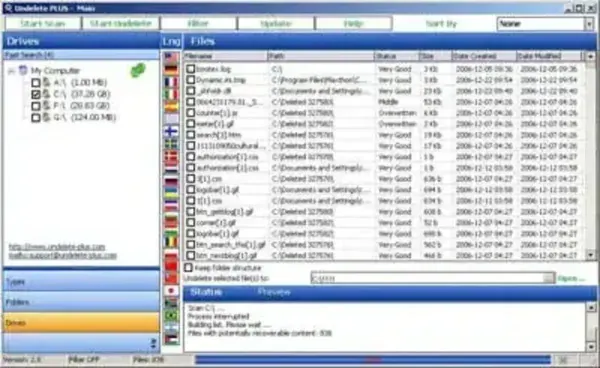
Undelete Plus scans supported storage volumes for deleted files whose data may not yet have been overwritten. The official documentation describes support for NTFS/NTFS5 and FAT12, FAT16, and FAT32 volumes, along with file filtering by type, name, size, and dates. Recovery is not guaranteed: success depends on the storage device, the filesystem, and whether the deleted data has been overwritten or otherwise become unavailable.
The vendor lists Windows XP through Windows 11, including 32-bit and 64-bit editions, on its download page. Check the current requirements before installing it, especially if you are using a newer Windows build or a specialized storage device.
Features
- Scan supported Windows volumes for deleted files.
- Filter scan results by file type, filename, size, and dates.
- Browse results using file-type and folder views.
- Search for recoverable documents, images, and other files where the underlying data remains available.
- Evaluate scan results before deciding whether to purchase a license.
Features can vary by version, and the vendor's documentation should be treated as the authority for the current release. Older descriptions of a dedicated Photo SmartScan, deep scanning, or portable USB operation should not be assumed to apply to every current edition unless confirmed in the current product documentation.
Is Undelete Plus Free?
Undelete Plus can be downloaded for evaluation, but the official support and refund pages state that the trial can identify files and evaluate recovery prospects without completing the recovery operation. A purchased license is required to restore files. Check the vendor's current pricing and license terms before relying on the program for recovery.
Download and Compatibility
- Developer: TouchStoneSoftware
- Current version listed by the vendor: 4.0.23.823
- Release date shown on the download page: September 30, 2024
- Operating system: Windows; the vendor lists support through Windows 11, in 32-bit and 64-bit editions
- Download type: Windows installer (undeleteplus_setup.exe)
- License: Evaluation scan available; paid license required for recovery
- Official download: Undelete Plus download page
- User guide: Official Undelete Plus help guide
Important File-Recovery Advice
If you have just deleted important files, stop writing new data to the affected drive or memory card. Installing recovery software onto that same drive may overwrite data you want to recover. Where possible, run recovery from a separate device and save recovered files to a different physical drive. For a failing drive or irreplaceable data, consider professional recovery before repeatedly scanning or attempting repairs.
On SSDs and some removable storage devices, background cleanup or TRIM can reduce the chance of recovery. No recovery utility can guarantee that deleted files will be restored intact.
Alternatives
Compare the current license terms, supported filesystems, and recovery workflow before choosing a tool. Recuva and PhotoRec are other file-recovery options covered on PendriveApps; their interfaces, supported cases, and recovery approaches differ. Always confirm current availability and documentation at each project's official source.
Final Thoughts
Undelete Plus remains listed by its vendor, but it should not be described as a completely free recovery solution: the trial is for evaluating scan results, and recovery requires a paid license. Its official current download is an installer, not a verified portable USB edition. Review the current license and requirements before installing, and avoid writing data to the affected device if recovering deleted files is your priority.
