
Alien Arena is a free, open source arena first-person shooter for Windows, Linux, and macOS. Built around 1950s-era sci-fi aesthetics, it delivers fast-paced deathmatch gameplay in the style of classic Quake and Unreal Tournament - with 23 levels, a diverse futuristic weapons roster, multiple game modes, and a mutator system that lets you customize each match. It is fully portable and runs directly from a USB flash drive with no installation required.
Quick summary: Install to a folder, copy it to a USB drive, and run crx.exe from the drive on any compatible Windows, Linux, or macOS machine. No installation on the host system. Supports online multiplayer, offline bot matches, and LAN play. Free to download and play.
Alien Arena | Portable Free FPS Game
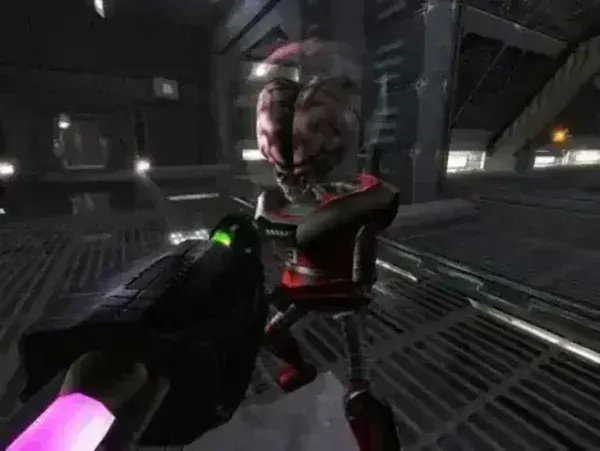
Originally developed by COR Entertainment and first released in 2004, Alien Arena is an open source FPS that has built a reputation for action-packed sci-fi battles, a wide selection of futuristic weapons, and active community-driven content. The game runs on the open source CRX engine and focuses primarily on online multiplayer action, though it includes full bot AI for offline practice and local LAN matches.
Unlike many modern shooters that require massive downloads and high-end hardware, Alien Arena is designed for accessibility - it runs on mid-range machines and is compact enough to carry on a USB stick. The retro 1950s sci-fi theme, fast movement, and classic deathmatch format make it a good fit for anyone who enjoys old-school arena shooters like Xonotic, Quake III Arena, or Unreal Tournament.
Alien Arena Game Features
- Fast-Paced Arena Combat: High-speed deathmatch gameplay with tight controls and quick respawns - built for fans of classic arena shooters.
- Retro Sci-Fi Setting: 1950s-inspired alien-themed maps, futuristic arenas, and vibrant environments create a distinctive visual style.
- Multiple Game Modes: Deathmatch, Team Deathmatch, Capture the Flag, All Out Assault (players can enter randomly spawned jetpacks for aerial combat), and Tactical (Alien vs. Human team objective mode where players plant bombs to destroy the opposing team's base).
- Mutator System: Customize each match with mutators including Instagib, Rocket Arena, Excessive (increased weapon power), Low Gravity, Regeneration, and Vampire - significantly changing how each game plays.
- 23 Levels: Diverse maps from tight dueling arenas to larger open spaces, accommodating different game modes and playstyles.
- Futuristic Weapons Arsenal: Energy rifles, plasma blasters, rocket launchers, and alien weaponry - each with a distinct feel and role in combat.
- Offline Single Player: Full bot AI (the CodeRED ACE Bot) for practice matches without an internet connection.
- Rewards System: An in-game rewards system tracks achievements and milestones across play sessions.
- Character Customization: Adjust alien avatars, skins, and settings for a personalized experience.
- Community Mods and Custom Maps: The active community continues to create mods, additional maps, and custom content.
- Cross-Platform: Available on Windows, Linux, macOS, and FreeBSD - all platforms can connect to the same online servers.
- OpenGL-Powered Graphics: Smooth performance on mid-range hardware using the CRX engine with OpenGL rendering.
- Free and Open Source: The CRX engine is open source. Game content is freeware - free to play but not for commercial resale.
How to Make Alien Arena Portable
- First, install Alien Arena to its default installation path (commonly C:\Alien Arena 7_XX).
- Copy the entire Alien Arena 7_XX folder to your USB flash drive.
- Run the portable version by launching
crx.exedirectly from your USB stick on any compatible machine.
Tip: Once copied to your USB drive, you can uninstall the original version from your computer, freeing up hard drive space while keeping the portable version ready to play anywhere.
Game Specifications | Official Site | Download
- Official Website: red.planetarena.org
- Developer: COR Entertainment
- Engine: CRX Engine (open source)
- First Release: 2004
- Extracted Size: ~1 GB
- Operating Systems: Windows, Linux, macOS, FreeBSD
- License: Freeware (content) / Open Source (CRX engine)
- Rating: 5 Star
- Download: Alien Arena Download
Frequently Asked Questions
Is Alien Arena still free?
Yes. Alien Arena is free to download and play. The CRX game engine is open source. The game's content (maps, models, textures) is proprietary freeware - free to use but not for commercial resale or redistribution.
Does Alien Arena support offline play?
Yes. The game includes the CodeRED ACE Bot system for single-player bot matches and supports local LAN play without an internet connection. Online multiplayer is available but not required.
What game modes does Alien Arena include?
Deathmatch, Team Deathmatch, Capture the Flag, All Out Assault (aerial combat with randomly spawned jetpacks), and Tactical (Alien vs. Human team objective mode). The mutator system lets you further modify any mode with options like Instagib, Rocket Arena, Low Gravity, Excessive, Regen, and Vampire.
What are mutators?
Mutators are game modifiers that change the rules of a match. Examples include Instagib (one-hit kills with a railgun-style weapon), Low Gravity (reduced gravity for floatier movement), Rocket Arena (rockets only), and Vampire (killing opponents restores your health). Multiple mutators can be combined.
How does Alien Arena compare to Xonotic?
Both are free, open source, portable arena FPS games with online multiplayer. Alien Arena has a distinctive 1950s sci-fi aesthetic, a mutator system, and unique modes like All Out Assault. Xonotic has a more technically deep movement system (strafe jumping, rocket jumping) and is generally considered to have a more active online player base today. Both are worth trying - they complement each other well.
Can I run Alien Arena on older hardware?
Yes. The CRX engine is designed for broad compatibility and runs on mid-range and older hardware using OpenGL rendering. Graphics settings can be scaled down for lower-end machines.
Final Thoughts
Alien Arena delivers exactly what it promises - fast, chaotic arena shooter gameplay in a unique retro sci-fi setting, completely free and portable. Its mutator system, diverse game modes, and LAN-friendly design make it a particularly good choice for group play, school labs, and gaming sessions where installing software is not practical. For fans of old-school deathmatch games who want something with personality and no cost, it is well worth keeping on a USB drive alongside tools like Xonotic.
