
Xleaner is a free and portable PC cleaner designed to help users clean up junk files, optimize system performance, and protect personal privacy. Lightweight and easy to use, Xleaner functions in a similar way to CCleaner Portable, but with a stronger emphasis on privacy protection and trace removal.
Because it is fully portable, the free software can be run directly from a USB flash drive or other removable media without installation. This makes it ideal for technicians, privacy-conscious users, or anyone who wants to clean a system without leaving behind configuration files or registry entries.
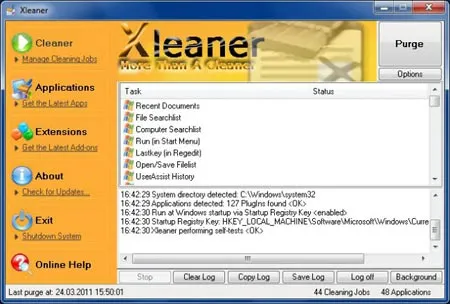
Xleaner works by removing common computer usage traces and temporary data, including web browsing history, cookies, cache files, and temporary folders. It can also clear Windows temporary files, recent document lists, search histories, and various forms of junk data that accumulate over time. For users who regularly maintain multiple systems, it provides a fast and convenient way to "clean your PC" without installing heavier software.
Key Features
- System Cleaner: Removes temporary files, internet cache, cookies, browser history, and other unnecessary system data.
- Registry Cleaner: Scans for invalid or broken registry entries and allows safe cleanup to improve system stability.
- Junk File Cleaner: Deletes leftover and obsolete files that consume disk space over time.
- Privacy Protector: Helps erase personal traces such as browsing history, recent documents, and application usage data.
- Startup Manager: Allows control over startup programs to reduce boot time and improve overall system responsiveness.
- Highly Customizable: Offers configurable cleaning options so users can fine-tune what data is removed.
- Portable Application: Runs directly from USB drives with no installation required.
- Freeware: Completely free to use, making it a costless system maintenance tool.
Free PC Privacy Cleaner | Xleaner Portable
How Xleaner Compares to Other PC Cleaners
Much like other portable system cleaners, Xleaner focuses on removing clutter and protecting user privacy. However, its small footprint and portability make it particularly useful in situations where installing software is not possible, such as on locked-down systems or shared computers. While it does not include every advanced feature found in larger commercial cleaners, it excels as a fast, no-nonsense cleanup utility.
Specifications | Official Site | Download
- Author’s Website: Project Page
- Creator: MoreThanACleaner
- Extracted Size: 4.14 MB
- License: Freeware
- Supported OS: Windows
- Download: Get this computer cleanup tool here: Xleaner Portable Download
Frequently Asked Questions (FAQ)
What is Xleaner used for?
To clean temporary files, remove junk data, clear browsing traces, and protect user privacy on Windows systems.
Is Xleaner really portable?
Yes, it does not require installation and can be run directly from a USB flash drive or external storage device.
Does Xleaner clean the Windows registry?
Yes. It includes a registry cleaner that can scan for invalid or broken registry entries and remove them safely.
Can Xleaner improve system performance?
By removing junk files, reducing startup programs, and cleaning unused registry entries, it can help improve system responsiveness and boot times.
Is Xleaner safe to use?
When used with default settings, it is generally safe. As with any system cleaner, advanced options should be used carefully.
How does Xleaner compare to CCleaner Portable?
It offers similar core cleaning features in a smaller, more lightweight package, making it a good alternative for quick cleanup tasks.
Final Thoughts
Xleaner Portable is a solid choice for users looking for a lightweight, free, and portable PC cleaner with a strong focus on privacy protection. Its ability to remove system junk, clean registry entries, and manage startup programs makes it a practical maintenance tool for everyday use or emergency cleanup situations.
For users who prefer portable utilities that leave no footprint behind, it fits perfectly into a USB toolkit alongside other privacy and system optimization tools reviewed and featured on PendriveApps.