
Virtual CD ROM is a Virtual CD ROM driver utility originally created by Microsoft. The tool allows users to mount ISO disk images and access them through an emulated CD-ROM drive, making it possible to run software distributed on optical media without requiring a physical CD or DVD drive. This was especially useful on computers that lacked optical drives but still needed to access installation media, software archives, or recovery discs stored as ISO files. For technicians and advanced users, it was once a handy portable style utility to keep available when working on systems without CDROM hardware.
Virtual CD ROM
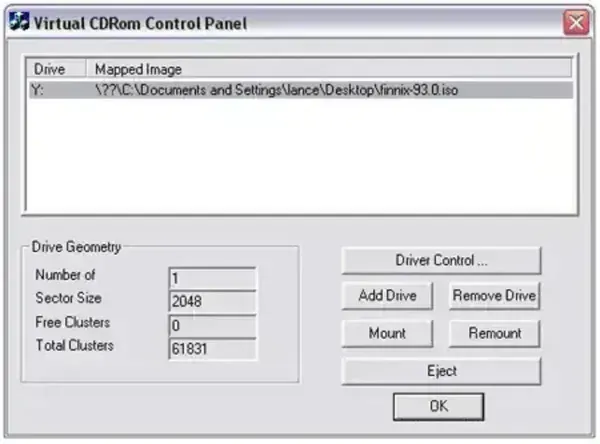
Microsoft Virtual CD-ROM Control Panel allowed ISO image files to be mounted as if a real disc had been inserted into the system. Once mounted, Windows treated the ISO exactly like a physical CD ROM, enabling users to browse files, run installers, or launch applications directly from the virtual drive. This utility was widely used during the Windows XP era, before Windows included native support for mounting ISO images.
What Is a Virtual CD ROM Used For?
- Running software distributed as ISO images
- Installing applications without burning physical discs
- Accessing archived CD/DVD media
- Using systems without built-in optical drives
- Reducing reliance on physical media
Legacy Microsoft Virtual CD ROM Utility
The original Microsoft tool was commonly distributed as: winxpvirtualcdcontrolpanel_21.exe
However, this utility is no longer officially available from Microsft and is considered obsolete. It is also no longer required on modern Windows operating systems. However, an archived download is available below.
Built In ISO Mounting in Modern Windows
Starting with Windows 8, Microsoft introduced native ISO mounting functionality directly into the operating system.
As a result, separate virtual CD drive utilities are no longer necessary for most users.
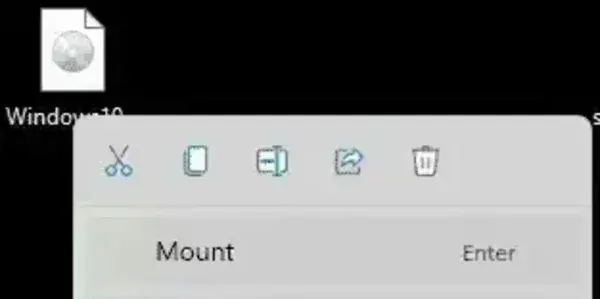
On Windows 8, Windows 10, and Windows 11, you can mount an ISO file by:
- Double clicking the ISO file, or
- Right clicking the ISO file and selecting Mount
Once mounted, the ISO appears in the VCD Control Panel as a virtual CD/DVD drive in File Explorer.
Specifications
- Author: Microsoft (Archived Page)
- Name: VCD Control Panel
- License: Freeware
- Original Target OS: Windows XP / early Windows Vista
- Current Status: Discontinued / superseded by built in Windows functionality
- Downloading: Download Virtual CD ROM
Frequently Asked Questions
Is Microsoft Virtual CD-ROM still available?
No. The original Microsoft Virtual CD-ROM VCD Control Panel utility is no longer distributed or supported.
Do I need this tool on Windows 10 or Windows 11?
No. Modern versions of Windows include native ISO mounting. No additional software is required.
Why was this tool useful in the past?
Earlier versions of Windows could not mount ISO files without third party software. This tool provided a simple solution before native support existed.
Are there still reasons to use virtual CD drive software today?
Yes. Virtual CD drive tools can still be useful on legacy systems, restricted environments, or when advanced mounting features are required.
Final Thoughts
Microsoft Virtual CD-ROM played an important role in making ISO based software distribution practical on early versions of Windows. While it is now obsolete, its functionality lives on through built in ISO mounting support in modern Windows releases.
For today's systems, no additional tools are needed. However, understanding this utility provides useful context for how virtual drive technology evolved on Windows platforms.
If you found this helpful, you might also be interested in checking out free portable CD/DVD burner Software.