
USB Flash Benchmark is a freeware USB benchmarking software tool created by heep.ru. This lightweight and portable application can be used as a reliable USB flash drive tester to measure and compare the real world read and write speeds of USB flash drives, thumb drives, pen drives, and even local hard drives.
Similar to more popular tools such as CrystalDiskMark, this tool is especially useful for identifying slow or counterfeit USB drives, comparing different flash drives before purchase, or troubleshooting performance issues when transferring large files or running portable applications from removable media.
USB Flash Benchmark Speed Testing Tool
This free benchmarking utility is shown below while speed testing a low cost Staples branded USB flash drive.
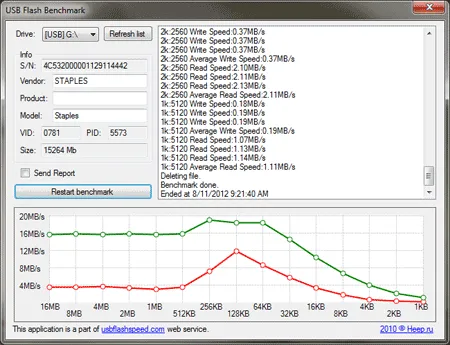
USB Flash Benchmark – shown performing a speed test
USB Flash Benchmark performs speed tests using a wide range of file sizes, starting with very small 1KB blocks and scaling up to large 16MB chunks. This approach provides a much more realistic performance profile than single size benchmarks, as USB drives often behave very differently depending on file size.
The results are displayed as easy to read graphs, allowing you to quickly see how well a flash drive performs under different workloads. In earlier versions, users could optionally upload their benchmark results to the USBFlashSpeed website to compare their drive against others worldwide.
Why USB Flash Drive Speed Matters
USB flash drive performance plays a critical role in many everyday tasks. While advertised speeds on packaging can be misleading, real world benchmark results reveal how a drive actually performs under different workloads.
Slow USB write speeds can dramatically impact tasks such as copying large files, creating bootable USB drives, running portable applications, or installing operating systems. Likewise, poor read performance can cause lag when launching programs or streaming media directly from a flash drive.
Using a dedicated USB benchmarking tool helps users:
- Verify manufacturer speed claims
- Identify underperforming or counterfeit USB drives
- Choose the best flash drive for portable software or bootable environments
- Understand how a drive performs with small files versus large files
This is especially important when using USB drives for live Linux distributions, system recovery tools, or portable operating systems where consistent performance is essential.
About USB Flash Benchmark and Its Features
USB Flash Benchmark is a popular portable utility used to assess the performance characteristics of USB flash drives. It measures key metrics such as sequential read and write speeds, access behavior across multiple file sizes, and device specific details.
You can use USB Flash Benchmark to:
- Evaluate USB speed: Measure how fast data can be read from and written to a USB flash drive to understand its real world performance.
- Compare USB flash drive performance: Benchmark multiple USB drives side by side to identify the fastest option for backups, portable apps, or bootable USB usage.
- Identify flash drive bottlenecks: Detect slow write speeds or performance drops that can negatively impact file transfers or portable software execution.
- Choose the right USB drive for specific tasks: Use benchmark data to select a drive suitable for video playback, gaming, large file transfers, or running portable operating systems.
- Perform detailed read and write speed tests: The tool runs sequential read and write tests to determine sustained performance rather than burst speeds.
- Benchmark using multiple file sizes: Tests range from 1KB to 16MB, simulating real usage scenarios such as document handling, media playback, and archive transfers.
- View graphed benchmark results: Performance results are displayed visually, with file size on one axis and transfer speed (MB/s) on the other.
- Rank flash drive performance: USB Flash Benchmark can rank drives based on results, helping users identify above average or underperforming devices.
- Visualize USB speed data: Clean graphs make it easy to interpret how performance scales with file size.
- User friendly interface: Simply select the target drive letter and start the benchmark with no complicated configuration.
- View detailed USB specifications: Displays drive name, capacity, controller information, and firmware details when available.
Unlike synthetic benchmarks that focus only on peak speeds, USB Flash Benchmark provides a more accurate picture of how a drive will perform during everyday use.
Understanding USB Flash Benchmark Results
USB Flash Benchmark presents its results using clear line graphs that plot transfer speed against file size. This visualization makes it easy to understand how a flash drive behaves under different conditions.
Many USB drives perform well with large files but struggle with smaller file sizes. Since operating systems and portable applications rely heavily on small file access, these results are often more important than peak speeds.
Key things to look for in benchmark results include:
- Consistent write speeds: Large drops may indicate poor controllers or low quality flash memory.
- Small file performance: Crucial for portable apps and bootable USB drives.
- Read vs write balance: Some drives read quickly but write extremely slowly.
- Stability: Erratic graphs can indicate throttling or firmware issues.
By analyzing these patterns, users can make informed decisions about which USB drives are suitable for backups, portable software, or performance critical tasks.
USB Flash Benchmark Specs and Download
- Authors Website: Archived Project Page
- Developer: heep.ru
Note: This project appears to have been discontinued. An archived version is provided. - Extracted Size: 92 KB
- License: Freeware
- Operating Systems: Windows 11, Windows 10, Windows 8, Windows 7
- Price: Free
- Application Category: Utility / USB Benchmarking Tool
- Editor's Rating: ★★★★★
- Downloading: You can get the last known version of this USB speed testing tool here:
USB Flash Benchmark Download
Common Use Cases for USB Flash Benchmark
This portable USB speed testing tool is useful in a wide range of scenarios, including:
- Testing new USB flash drives: Confirm performance immediately after purchase.
- Comparing multiple drives: Choose the fastest option among several USB sticks.
- Diagnosing slow file transfers: Identify whether the USB drive is the bottleneck.
- Evaluating drives for bootable USB creation: Ensure sufficient speed for live environments and installers.
- Portable app optimization: Select drives capable of running applications smoothly.
- Detecting fake capacity USB drives: Inconsistent performance can be an early warning sign.
Because USB Flash Benchmark is fully portable and requires no installation, it can be run on virtually any Windows system for quick diagnostics.
Final Thoughts on USB Flash Benchmark
USB Flash Benchmark remains a powerful and extremely lightweight tool for testing USB flash drive speed and benchmarking real world flash drive performance. Whether you're a hardware enthusiast comparing multiple thumb drives or a casual user checking if a USB stick is underperforming, this utility delivers fast, accurate, and visually informative results.
Its ability to test read and write performance across file sizes from 1KB to 16MB provides valuable insight into how a drive behaves under different workloads. Combined with clear graphs and a simple interface, it is well suited for both beginners and advanced users.
Although the original project appears to be discontinued, USB Flash Benchmark is still highly useful today and remains a valuable addition to any portable diagnostic or USB toolkit.
If you're serious about comparing USB flash drive speeds, diagnosing performance issues, or understanding real world USB behavior, this tool is still worth using. You may also want to explore alternative USB benchmarking utilities such as SpeedOut for additional performance testing options.