
USB Drive Info is a free portable USB analysis tool that displays detailed technical information about USB flash drives, memory cards, and external storage devices. Developed by Uwe Sieber, this lightweight utility is especially useful for identifying fake USB drives, checking real storage capacity, and viewing controller and firmware details.
Because USB Drive Info is fully portable, it can be run directly from a USB flash drive or other removable media without installation. This makes it an excellent diagnostic tool for technicians, forensic analysis, and everyday users who want to verify USB hardware authenticity.
USB Drive Info | Portable USB Device Information Tool
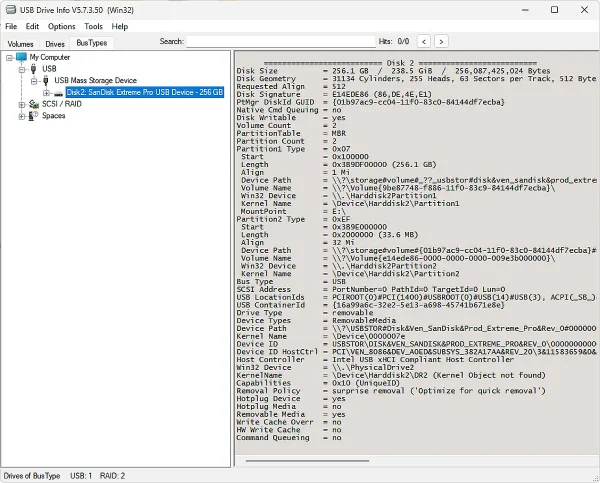
USB Drive Info provides low level details that are not normally visible in Windows Explorer. It can display the real manufacturer, controller type, serial number, firmware version, USB version, and reported versus actual capacity. This makes it particularly valuable when dealing with counterfeit USB drives that falsely report larger storage sizes.
Key Features
- Portable Operation: Runs without installation from a USB drive.
- Detect Fake USB Drives: Identifies mismatched or manipulated storage capacity.
- Controller and Firmware Info: Displays chipset, firmware version, and vendor data.
- Serial Number and VID/PID: Shows detailed USB identification values.
- USB Version Detection: Identifies USB 2.0, USB 3.0, and newer standards.
- Read Only Tool: Does not modify or write data to the device.
Why Use USB Drive Info?
USB Drive Info is ideal for users who need accurate and trustworthy information about removable storage devices. It is commonly used to verify newly purchased USB flash drives, troubleshoot compatibility issues, and analyze unknown or suspicious devices. Since the tool is read only, it is safe to use on production or evidence media.
Portable Usage
The application is distributed as a standalone executable. Simply copy the file to your USB flash drive and launch it on any supported Windows system. No registry entries or system files are created, keeping the host machine clean.
USB Drive Info Specifications
- Author's Website: Official Project Page
- License: Freeware
- Supported Operating Systems: Windows
- Installation Required: No
- Category: USB Utilities, System Information Tools
- Editor's Rating: 4 Star
- Download
Frequently Asked Questions
Is USB Drive Info free to use?
Yes. USB Drive Info is completely free for personal and professional use.
Can USB Drive Info detect fake USB flash drives?
Yes. It can reveal incorrect or manipulated capacity values and identify suspicious controllers often used in counterfeit devices.
Does it modify my USB drive?
No. The tool is read only and does not write data or make changes to the device.
Can I run it from a USB stick?
Yes. It is fully portable and can be launched directly from removable media without installation.
Which versions of Windows are supported?
USB Drive Info works on modern Windows versions, including Windows 7, 8, 10, and 11.
Final Thoughts
USB Drive Info is a must have portable utility for anyone who works with USB storage devices. Its ability to expose real hardware details and detect counterfeit drives makes it especially valuable for technicians, IT professionals, and cautious everyday users. Lightweight, portable, and reliable, it fits perfectly into any USB troubleshooting toolkit.