
Tiny Spell is a free, lightweight, and portable spell checker for Windows that works system-wide across virtually any application. It can monitor your typing in real time, detect misspelled words on the fly, and notify you instantly. In addition to live spell checking, Tiny Spell can also check the spelling of copied clipboard text, making it a convenient utility for everyday writing tasks.
Tiny Spell | Portable System Wide Spell Checker
What Is Tiny Spell?
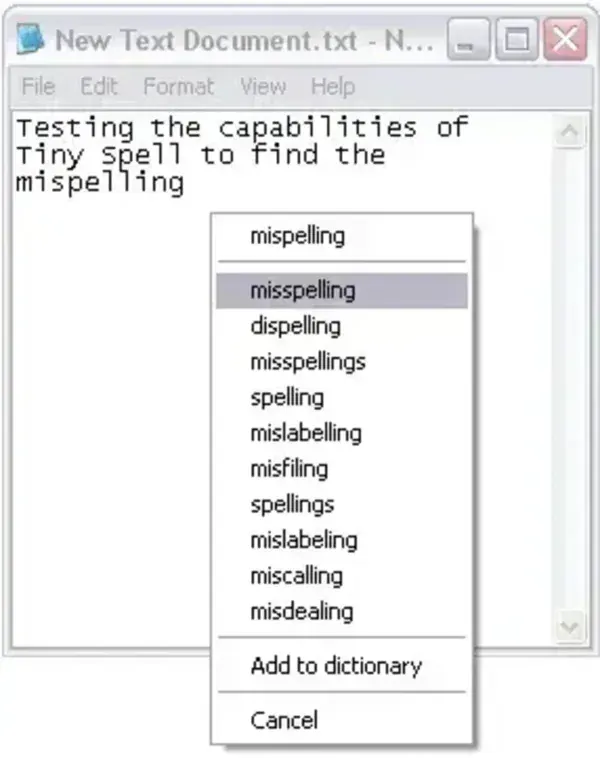
Tiny Spell is a small Windows utility designed to provide spell checking functionality across applications that do not include their own built-in spell checker. Unlike traditional spell checkers that only work inside word processors, it runs entirely in the background and monitors your typing system wide.
When a misspelled word is detected, the tool alerts you immediately, allowing you to correct mistakes as you type. This makes it especially useful for writing emails, forum posts, chat messages, code comments, or text entered into older or lightweight applications.
Key Features
Despite its small size, Tiny Spell offers several useful features:
- System-Wide Spell Checking: Works with nearly any Windows application, including browsers, text editors, email clients, and chat programs.
- Real-Time Typing Monitor: Detects misspelled words as you type and notifies you instantly.
- Clipboard Spell Checking: Checks copied text from the clipboard for spelling errors.
- Taskbar Integration: Runs quietly in the system tray when active, staying out of the way.
- Extremely Lightweight: Requires less than 1 MB of disk space.
- Portable: No installation required; runs directly from a USB flash drive.
Why Use a Portable Spell Checker?
TinySpell Portable Spelling Checker is particularly useful for users who:
- Use applications without built-in spell checking
- Frequently type text outside of word processors
- Work on multiple computers and want consistent spell checking
- Prefer lightweight, no install utilities
Because it runs entirely from a portable folder, this free spell checking tool leaves no traces behind and can be carried with you on a USB drive for use on any Windows system.
System Resource Usage
One of Tiny Spell's biggest advantages is its minimal footprint. The complete portable setup uses less than 1 MB of storage and consumes very little memory while running, making it suitable even for older or low resource systems.
Specifications | Official Site | Download
- Author’s Website: TS Project Page
- License: Freeware
- Platform: Windows
- Portable: Yes
- Disk Usage: < 1 MB
- Rating: ★★★★★ (5 Star)
- Downloading: Download Tiny Spell Portable
Final Thoughts
Tiny Spell is a simple yet highly effective portable spell checker that fills a gap left by many Windows applications. Its ability to monitor typing in real time, check clipboard text, and run quietly in the background makes it a valuable productivity tool. With its extremely small size and portable design, it is an easy addition to any USB toolkit for users who want system wide spell checking wherever they go.
