
H2testw is a free Windows utility that checks the usable capacity and data integrity of USB flash drives, SD cards, and other writable storage. It writes test files to the available space selected for testing, then reads them back to check for mismatches and errors. This can reveal counterfeit-capacity devices or unreliable storage, but a successful test only applies to the space tested and does not guarantee future reliability. Additionally, it can check USB sticks and memory cards for errors, making it a reliable tool for safeguarding your data. This lightweight and portable software supports both English and Deutsch languages.
H2testw | Detect Fake USB Flash Drives | Test for Errors
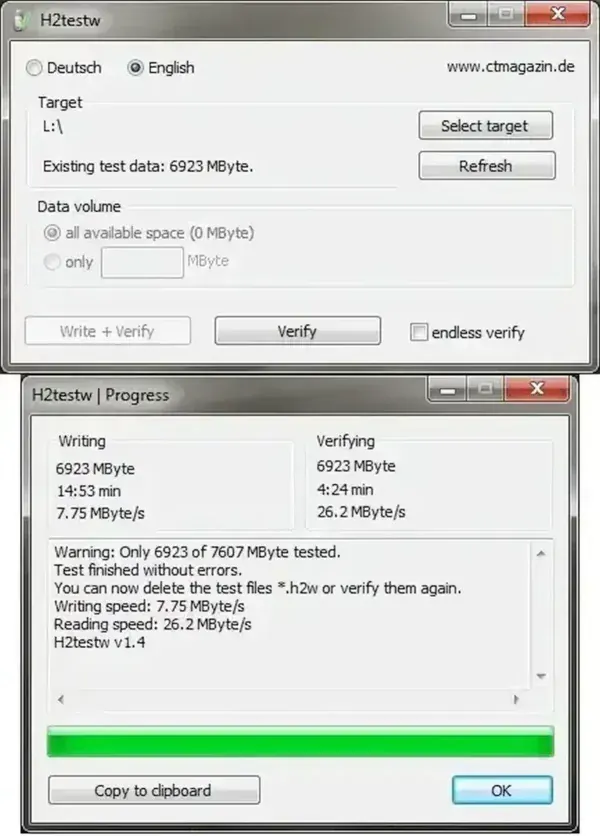
H2testw writes test data into the selected writable space and reads it back to compare the results. Capacity mismatches or read/write errors can indicate counterfeit storage or a failing device. A test without errors is useful evidence about the space tested, but it cannot guarantee that a drive will remain reliable or that every part of the device was tested.
Whether you're testing a new USB flash drive, troubleshooting an SD card, or identifying a faulty memory stick, H2testw is a must-have utility for storage testing.
Note: Back up important files before testing. H2testw normally creates test files in available space rather than deliberately overwriting existing files, but it can fill that space. Do not format the drive unless you intend to erase its contents.
Why Use H2testw?
Here are eight reasons why we think H2testw is an essential tool for flash drive testing and error checking:
- Capacity Testing: Verifies if the device's actual storage matches the claimed capacity.
- Data Integrity Verification: Confirms there are no errors during data writing and reading.
- Fake Device Detection: Identifies counterfeit devices reporting larger than actual capacities (testing for fake size USB drives).
- Performance Insights: Measures read and write speeds for better performance understanding. Note: While H2testw provides insights into device speeds, it is not a detailed benchmarking tool. For more comprehensive performance analysis, consider tools like CrystalDiskMark.
- Portable Utility: A standalone executable that requires no installation.
- User-Friendly: Features a simple interface for hassle-free testing.
- Detailed Reporting: Provides comprehensive error and performance reports.
- Wide Compatibility: Works with various versions of Windows, including Windows 11, 10, 8, and 7.
How to Use H2testw to Test USB Drives
Follow these steps to use this USB testing tool:
- Download H2testw and extract the ZIP contents to a folder on your Windows computer, not to the drive you intend to test.
- Run the Executable: Launch the H2testw.exe file without installation.
- Select the Target Device: Choose the USB drive or SD card you want to test.
- Start the Test: Click "Write + Verify" to begin the testing process.
- Review the Report: Check for errors, speed details, and actual capacity in the generated report.
Warning: H2testw writes test files to the selected drive's available space and can fill it during testing. Back up important data, close files on the target drive, and confirm the correct drive letter before clicking “Write + Verify.” Do not format the drive unless you intend to erase its contents.
Frequently Asked Questions (FAQ)
What does H2testw do?
It is a utility designed to verify the actual capacity of USB flash drives, SD cards, and other flash memory devices. It writes a test pattern to the storage device and reads it back to check for errors or inconsistencies. This process helps detect fake drives and ensures the device can reliably store data without corruption.
Can H2testw recover lost or corrupted data?
No, the USB checking software strictly functions as a testing tool. For data recovery, use specialized software such as Wise Data Recovery.
Is H2testw compatible with macOS or Linux?
No, it is designed for Windows. macOS and Linux users can run it via Wine, VirtualBox, or consider alternatives like F3 (Fight Flash Fraud).
Does it support drives larger than 1TB?
Yes, but testing large drives may take significant time. Users can test portions of the drive to save time.
What should I do if H2testw finds errors?
Errors may indicate counterfeit drives, failing hardware, or data corruption from unsafe usage. Avoid using such drives for critical data and contact the seller or manufacturer if new.
Can H2testw test multiple drives simultaneously?
No, it tests one device at a time. For multiple devices, run separate instances or use alternative batch-testing tools.
Is H2testw safe to use?
H2testw writes test files to available space and can fill the selected drive. Back up important data, confirm the target drive, and avoid formatting or other destructive operations unless you intend to erase the drive.
Does it work with encrypted drives or partitions?
No, encrypted drives may not test correctly. Decrypt the drive or use tools compatible with encrypted storage.
Additional Notes
Testing New Devices: If you've recently purchased a USB flash drive or SD card, using H2testw is a smart first step to confirm the device's authenticity and functionality. This can help avoid the unpleasant surprise of using a counterfeit or malfunctioning device.
Write operations: H2testw writes test files into the selected available storage space and then verifies them. The test can fill free space, so back up important data and make sure you have enough room before starting. A normal file-based test does not automatically erase every existing file.
Safety considerations: H2testw is designed to verify storage by writing and reading test files. It is not a repair tool, and a clean result cannot guarantee future reliability. Download it from a source you trust, confirm the target drive carefully, and back up important files before testing.
Alternatives to H2testw
If you find this free fake USB detection software useful, you might also consider FakeFlashTest, another free utility for detecting counterfeit USB drives and SD cards. Additionally, USB Flash Tools is a versatile toolkit for USB testing. It also includes features to check a USB stick for errors and assess a device's reliability. For benchmarking and more detailed speed or performance testing, you may want to explore tools like CrystalDiskMark.
Comparison Chart:
| Feature | H2testw | FakeFlashTest | USB Flash Tools |
|---|---|---|---|
| Fake Device Detection | Yes, detects counterfeit drives with incorrect storage capacity | Yes, specifically designed for detecting fake flash drives | Yes, detects counterfeit drives, but also has additional features |
| Test Type | Writes test data to the device, checks for errors, and verifies capacity | Compares reported storage size with actual capacity | More comprehensive testing including error checking and device reliability |
| Additional Features | Simple error and performance reports, capacity check | Focuses primarily on fake USB flash drive detection | Includes backup, restore, and format utilities for USB drives |
| Performance Benchmarking | No dedicated benchmarking features, basic read/write speed checks | No performance benchmarking | Includes performance tests such as read/write speed analysis |
| Supports Large Drives (1TB+) | Yes, with potentially longer test times for large drives | No specific mention for large drives | Yes, supports testing large capacity drives |
| Compatibility with Encrypted Drives | Does not support encrypted drives | Not optimized for encrypted drives | Can test encrypted drives, but with limitations |
Specifications
- Official Website: Project Home Page
- Developer: Harald Bögeholz
- Extracted Size: 438 KB
- License: Freeware
- Supported Operating Systems: Windows 11, 10, 8, 7
- Application Category: Utility
- Editor's Rating: 4.5 Star
Final Thoughts
H2testw is a nice portable and free tool to use for testing the authenticity and reliability of USB drives and SD cards. Whether you are verifying a new purchase or troubleshooting an existing device, this tool helps ensure your data is stored safely and securely. By detecting counterfeit devices and checking a drive for errors, it can help you avoid data loss and ensures that your storage devices are working as expected. But you should be aware to always back up your data before performing any tests to ensure you don't lose any of your important files.
