
Temp File Cleaner (TFC) is a free portable utility designed to delete temporary files and other unnecessary system data from Windows computers. By removing accumulated temporary files, browser caches, update caches, log files, and other junk, it can help reclaim valuable disk space and improve overall system maintenance. Because it runs as a standalone application, you can launch it directly from a USB flash drive without installing anything on the host computer.
Temp File Cleaner | Free Portable Windows Cleanup Tool
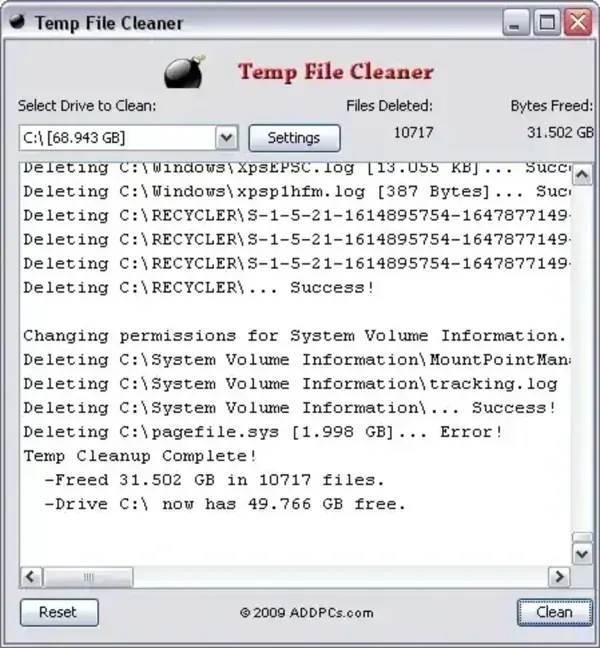
Over time, Windows and many installed applications create temporary files that are often left behind after updates, installations, or normal everyday use. While many of these files are harmless, they can gradually consume gigabytes of storage space. Temp File Cleaner helps remove this unnecessary clutter with a simple interface and a single cleanup process.
Personal experience: During testing, I reclaimed more than 31 GB of disk space from a system that hadn't been cleaned in quite some time. Your results will vary depending on how long it's been since your last cleanup and how heavily the system is used.
Note: Temp File Cleaner requires Java to be installed before it can run.
Key Features
- Delete Temporary Files: Removes temporary files created by Windows and installed applications.
- Clear Browser Data: Deletes temporary Internet files, browser cache, cookies, and browsing history.
- Windows Update Cleanup: Removes cached Windows Update installation files that may no longer be needed.
- User Temp Cleanup: Clears temporary files stored in user profile folders.
- Windows Cache Removal: Deletes various Windows cache files that accumulate over time.
- Recycle Bin Cleanup: Empties the Windows Recycle Bin to permanently remove deleted files.
- Recent Files Cleanup: Clears the Recent Documents history.
- Windows Prefetch Cleanup: Optionally removes Prefetch data. Windows will automatically rebuild this cache as needed.
- System Restore Cleanup: Can remove old System Restore data to reclaim additional disk space. Use this option carefully if you rely on restore points.
- Portable: Runs without installation, making it convenient for USB repair toolkits.
Why Use Temp File Cleaner?
Windows includes built-in tools such as Disk Cleanup and Storage Sense, but Temp File Cleaner combines many common cleanup tasks into a single lightweight utility. It's especially useful for technicians maintaining multiple computers or users looking for a quick way to remove accumulated temporary files.
Cleaning temporary files may help:
- Recover valuable SSD or hard drive space.
- Remove leftover installation files.
- Clear outdated browser caches.
- Reduce unnecessary system clutter.
- Prepare a system before creating backups or disk images.
How to Use Temp File Cleaner
- Download Temp File Cleaner from the official website.
- Ensure Java is installed on your Windows computer.
- Launch the application.
- Select the cleanup options you wish to perform.
- Click the cleanup button and allow the utility to finish scanning and deleting temporary files.
- Restart Windows if prompted.
Things to Keep in Mind
- Deleting browser cookies will sign you out of many websites.
- Cleaning browser caches may temporarily slow page loading until the cache is rebuilt.
- Removing System Restore points limits your ability to roll Windows back to an earlier state.
- Some temporary files currently in use cannot be removed until Windows is restarted.
Specifications
- Author's Website: AddPCS Project Page
- Developer: AddPCS
- License: Freeware
- Requirements: Java Runtime Environment (JRE)
- Supported Operating Systems: Microsoft Windows
- Category: System Cleanup Utility
- Editor's Rating: ★★★★☆
- Download: Download Temp File Cleaner
Final Thoughts
Temp File Cleaner is a straightforward maintenance utility for removing temporary files and reclaiming disk space on Windows computers. Its portable design makes it especially useful for technicians and users who maintain multiple systems, while its broad selection of cleanup options allows you to remove many common sources of system clutter with minimal effort.
If you're looking for a lightweight portable cleanup utility that focuses on deleting temporary files rather than acting as a full system optimizer, Temp File Cleaner remains a useful addition to any Windows troubleshooting toolkit.
