
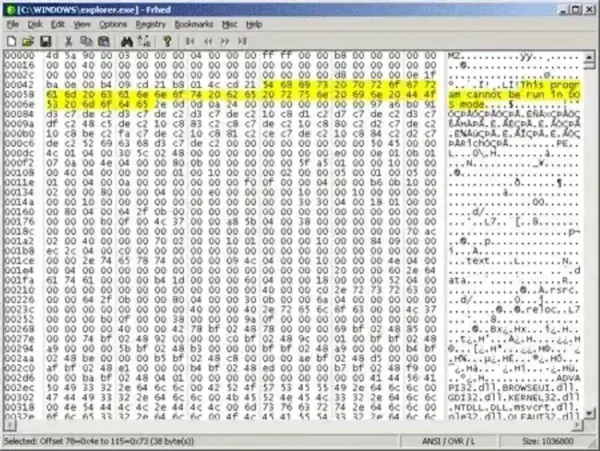
Frhed is a free hex editor, also known as a binary file editor, for Windows. It is lightweight, open source, and designed for editing binary files quickly and efficiently. A portable version is also available, making it easy to carry on a USB flash drive and use without installation.
Frhed | Free Portable Hex Editor
The portable edition allows you to run the editor directly from removable media without modifying the host system. This makes it especially useful for technicians, developers, and power users who work across multiple computers. Despite its small footprint, the tool includes advanced functionality comparable to other well known editors such as HxD.
Why Use Frhed Hex Editor?
This tool is practical for software developers, reverse engineers, and IT professionals who need to analyze or modify binary files. Whether you are inspecting executable files, debugging applications, or comparing raw data, this free hex editing software provides a fast and resource friendly standalone solution.
Key Features
- Editable file size limited only by available system memory
- Partial loading of large files to conserve memory
- Search and replace for both text and binary values
- Export hex dumps to file or clipboard
- File comparison feature to identify differences
- Bookmarking and customizable display settings
- Drag and drop support for quick file loading
Alternative Hex Editing Tool
While HxD was once widely regarded as one of the most powerful free hex editors, Frhed is often preferred for its smaller size, simplicity, and open source nature. If you need a lightweight editor that launches quickly, Frhed is an excellent choice. For advanced editing of extremely large files, HxD may offer additional capabilities.
Specifications
- Author's Website: Project Page
- License: Open Source
- Operating System: Windows
- Rating: 4 Star
- Download: You can get the last stable release here:
Download Frhed
FAQ
What is Frhed used for?
It is used for editing and analyzing binary files in hexadecimal format. It is commonly used by developers, security researchers, and IT technicians.
Is it free?
Yes, it is completely free and open source.
Does it support large files?
Yes, it can handle large files by loading them partially into memory.
Is there a portable version?
Yes, a portable version is available that can run directly from a USB drive without installation.
Frhed vs. HxD which is better?
Frhed is lighter and open source, while HxD offers more advanced features for very large files. The better choice depends on your specific needs.
Closing Thoughts
Frhed remains one of the best choices if you need a lightweight and portable hex editor for Windows. Its open source design, small size, and practical feature set make it ideal for developers and IT professionals who want a fast binary file editor without unnecessary overhead.
If you are looking for a simple yet capable hexadecimal editing tool that runs from a USB flash drive, this one might be worth adding to your USB toolkit. Users who require more advanced handling of extremely large files may also consider HxD as a complementary option.
Download a copy today and start editing binary files with a free, reliable, and portable hex file editing tool.