
HJSplit is both a file splitter and file joiner in one. It is an entirely free utility makes splitting and joining files, simple! This portable software can be used to split large files into smaller chunks (.001, .002, .003 etc) so that they may be sent via email or other methods that typically impose file size limits for transmitting files. It can even split files larger than 10GB and checksums can be created. Split files can then be rejoined using HJJoin tool (also included) with HJ-Split.
HJSplit Portable File Splitter | File Joiner
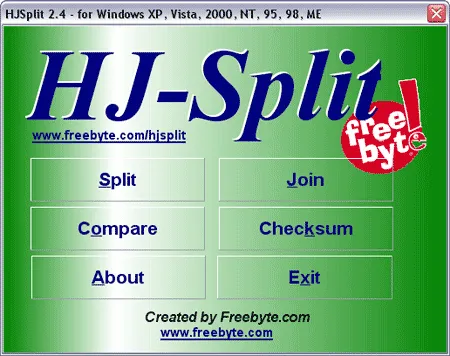
This is a popular freeware utility for splitting and joining files. It is commonly used to break large files into smaller parts or rejoin those parts to recreate the original file. It is available for various operating systems, including Windows, Linux, and macOS.
HJSplit has long been a favorite among users who need a simple, no-frills solution for handling large files. Because it is fully portable and requires no installation, it can be carried on a USB flash drive and used on virtually any compatible computer without leaving traces behind.
Unique Features
- Splitting Files: It allows you to split large files into smaller, more manageable parts. This can be useful when you need to transfer or store large files that might not fit on a single storage device or need to be sent over the internet in smaller chunks.
- Joining Files: It also provides the capability to join or merge split files back together to reconstruct the original file. This is particularly helpful when you receive a set of split files and need to combine them to access the content.
- No Installation Required (Stand Alone): The software is made available as a standalone executable, which means you don't need to install it on your system. The executable file can be stored and run directly from a USB drive.
- File Verification: Includes a checksum feature that allows you to verify the integrity of split and joined files, ensuring that they have not been corrupted during the splitting or transferring process.
- Supports 001 File Formats: It is associated with split files having extensions like ".001, .002, .003 etc". The utility can also be used to split files larger than 10GB.
- Freeware File Splitter and Joiner: This file manager is free and has been widely used by individuals and organizations for many years. It is especially useful when dealing with large files that need to be split into manageable segments or when sharing files across multiple storage devices or media.
It's important to note that this 001 file management tool doesn't provide compression or encryption features. Users primarily use it for dividing large files into smaller parts for more convenient storage or transmission and then reassembling them when needed.
Common Uses for HJSplit
- Sending large files via email services with attachment size limits
- Splitting files to fit on USB flash drives, CDs, or DVDs
- Breaking up large archives for easier cloud uploads
- Rejoining multi-part downloads with .001 file extensions
- Portable file management without installing software
How to Join .001 Files with HJSplit
- Place all split parts (.001, .002, .003, etc.) in the same folder.
- Run HJJoin (included with HJSplit).
- Select the first file in the sequence (usually ending in .001).
- Choose an output location and click Join.
- The original file will be reconstructed exactly as it was.
Specifications and Downloading
- Extracted Size: 348 KB
- Authors Website: HJ-Split Project Page ~ Archived Link
- Developer: Freebyte
- License: Freeware
- Release Date: 2010
- Supported Operating Systems: Windows 11, 10, 8, 7, Vista, XP, Linux, macOS
- Download: HJSplit Download
Frequently Asked Questions
What is a .001 file?
A .001 file is the first part of a split file created by tools like HJSplit. Additional parts follow sequentially (.002, .003, etc.). All parts are required to rejoin the original file.
Is HJSplit safe to use?
Yes, it's a reputable freeware utility that does not modify system files or require installation. It simply reads and writes file segments.
Can HJSplit split very large files?
Yes, it can handle files larger than 10GB, making it suitable for large backups, videos, disk images, and archives.
Does HJSplit compress or encrypt files?
No, it only splits and joins files. It does not provide compression or encryption features.
Do I need all split parts to rejoin a file?
Yes. All parts must be present in the same folder for the join process to complete successfully.
Final Thoughts
HJSplit remains one of the simplest and most reliable portable file splitter and joiner tools available. While it may lack modern features like compression or encryption, its strength lies in its speed, portability, and ease of use.
For users who regularly deal with large files, removable media, or multi part downloads, this is a practical file joining and file splitting utility that still holds up today. Its tiny file size and no install stand alone software design make it a perfect addition to any personal USB toolkit.