ExtremeCopy: Windows File Copy and Transfer Utility
ExtremeCopy is a Windows file-copy utility designed to manage copy and move operations with more control than the standard file transfer dialog. It was developed by EaserSoft and offered options such as pausing and resuming transfers, tracking progress, and handling file-copy tasks. The original developer website is no longer available, so this is best treated as a legacy software listing rather than a recommendation for a current system utility.
Manage File Copy and Move Operations
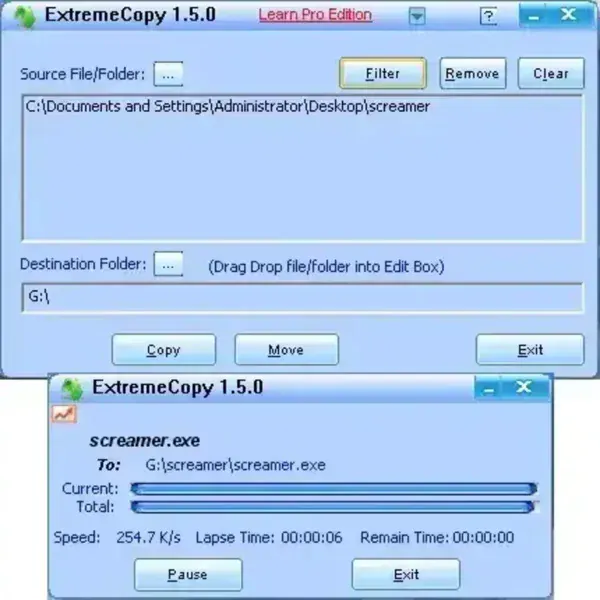
ExtremeCopy was intended to speed up copying and moving files or folders while displaying transfer progress and an estimated remaining time. Archived descriptions also mention pausing a task when a problem occurs and resuming after the issue is resolved. These controls can be helpful when transferring large folders or moving data to removable storage.
Some editions integrated with Windows Explorer, while the original listing described a small ZIP-based package. Features and licensing differed between free and paid editions, so do not assume that every archived build includes the same interface or transfer options.
Performance Claims and Practical Considerations
Older descriptions advertised transfer speeds up to 20% to 120% faster than Windows' built-in copy function. Treat those figures as historical marketing claims, not guaranteed results. Actual copy speed depends on the source and destination drives, connection type, file sizes, system load, and the Windows version. Modern Windows file handling has also changed since this program was released.
A file-copy utility should never be trusted with important data without verification. Keep a separate backup before large transfers and compare the destination files after copying, especially when moving irreplaceable files or working with aging storage devices.
ExtremeCopy Specifications and Availability
- Developer: EaserSoft
- Last widely documented version: 2.3.4
- License: Free and paid editions were documented
- Platform: Windows; current compatibility is unverified
- Original purpose: Copy, move, pause, and resume file transfers
- Developer website: No longer available
- Archived source reference: ExtremeCopy code repository. This repository notes that the original EaserSoft domain was lost and is not the official developer site.
- Editor's Rating: ★★★☆☆ (3/5)
Is ExtremeCopy Still Worth Using?
ExtremeCopy offered useful transfer controls, including pause and resume, progress details, and Windows integration. However, its original publisher site is gone, current support is unverified, and the advertised speed gains should not be expected on modern hardware. The available source repository is a community-hosted reference, not confirmation of an official supported release. For most current Windows systems, the built-in copy tools or a maintained file manager are the safer starting point. Browse our portable file managers for related utilities.