
Connection Monitor is a free, standalone portable utility that lets you monitor inbound and outbound socket connections in real time. By showing exactly which network and internet connections are active, it helps you better understand and secure your system.
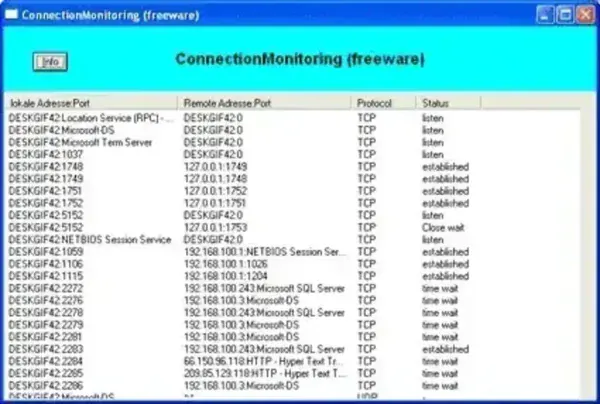
This lightweight tool scans current connections and displays detailed information including local and remote addresses, ports, protocol type (TCP or UDP), and connection status. It is especially useful for troubleshooting network activity or identifying unknown connections.
Connection Monitor - View Active Network Connections
If you want a simple way to monitor network activity without installing complex software, Connection Monitor provides a straightforward solution. It runs as a standalone executable, making it ideal for use from a USB drive or as part of a portable toolkit.
What Does Connection Monitor Do?
Connection Monitor scans your system and lists all active socket connections. It shows both incoming and outgoing traffic, allowing you to see which applications are communicating over your network.
This can help you:
- Identify unknown or suspicious connections
- Monitor application network activity
- Troubleshoot connectivity issues
- Understand how programs use your internet connection
Key Features
- Real Time Monitoring: View active inbound and outbound connections as they occur.
- Detailed Connection Data: Displays local and remote IP addresses, ports, and protocol types.
- TCP and UDP Support: Monitor both major transport protocols.
- Connection Status: See whether connections are established, listening, or closed.
- Lightweight Design: Minimal system resources required.
- Portable Use: Run directly from a USB drive without installation.
Why Use Connection Monitor?
This tool is useful for anyone who wants quick visibility into network activity without the complexity of advanced monitoring suites. It is particularly helpful for basic security checks and simple diagnostics.
However, since development appears to have stopped, users looking for more advanced features or ongoing updates may want to consider alternatives.
Alternatives to Connection Monitor
If you need a more actively maintained or feature rich solution, consider the following tools:
- CurrPorts - A powerful TCP/IP port monitoring tool with process level details and control options.
- NetWorx - A network monitoring tool focused on bandwidth usage and traffic analysis.
Specifications
- Author Website: The official site appears to have been abandoned by its developer.
- License: Freeware
- Platform: Windows
- Category: Network monitoring / socket connection viewer
How to Use Connection Monitor
- Download the Connection Monitor executable file.
- Run the program directly, no installation required.
- View the list of active connections in the main window.
- Analyze IP addresses, ports, and connection states.
Connection Monitor provides a quick and simple way to check active network connections, making it a useful addition to any portable troubleshooting toolkit.