
Windows Enabler is a free portable system utility that allows users to enable grayed out or disabled buttons, checkboxes, and window controls in many Windows applications. If you have ever encountered a setting that is visible but unavailable (disabled due to software restrictions or UI limitations) this tool may allow you to temporarily force it back into an enabled state.
This lightweight utility is commonly used for testing, troubleshooting, legacy software interaction, and advanced system experimentation. Because it can override application-level restrictions, Windows Enabler should be used cautiously and only by users who understand the risks involved.
The tool runs silently in the system tray and can be toggled on or off with a single click. When enabled, it attempts to re enable disabled controls in the currently active window.
Windows Enabler In Action
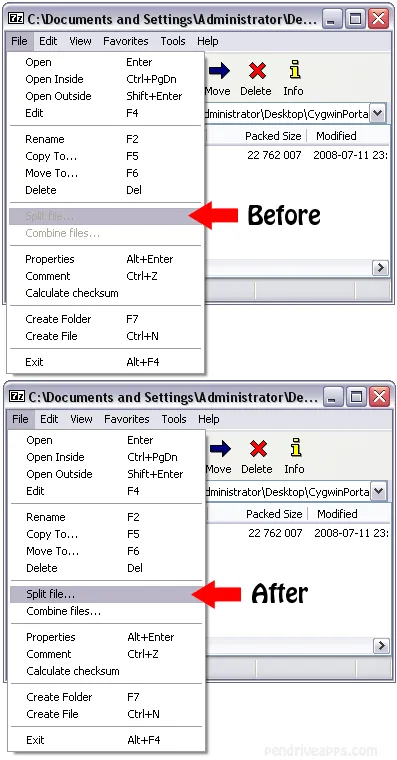
Important Warning: Just because an option is normally grayed out does not mean it is safe to enable. Many controls are intentionally disabled to prevent data loss, corruption, or system instability. Using Windows Enabler incorrectly can lead to application crashes, corrupted settings, or system problems. This tool is intended for advanced users who understand the consequences.
What Windows Enabler Can Do
- Enable Disabled Buttons: Forces inactive buttons to become clickable.
- Enable Grayed Out Checkboxes: Reactivates disabled tick boxes in dialogs.
- Override UI Restrictions: Temporarily bypasses application level UI limitations.
- System Tray Control: One click enable/disable from the tray icon.
- Fully Portable: Runs without installation and leaves no permanent footprint.
Common Use Cases
Windows Enabler is often used for:
- Testing legacy or abandoned Windows software
- Exploring hidden or disabled configuration options
- Troubleshooting application UI issues
- Advanced system experimentation in controlled environments
It is not recommended for routine system configuration or production environments.
Specifications | Official Website | Download
- Extracted Size: 252 KB
- Author’s Website: Archived Project Page
- License: Freeware
- Supported Operating Systems: Windows
- Application Category: Portable System Utility
- Download: Grab this free portable system tool here: Windows Enabler Download
FAQ
What does Windows Enabler do?
Forces disabled or grayed out window controls (such as buttons and checkboxes) to become enabled so they can be clicked or modified.
Is Windows Enabler safe to use?
It can be safe when used carefully by advanced users, but enabling controls that were intentionally disabled can cause crashes, data loss, or system instability.
Does Windows Enabler permanently change system settings?
No. It temporarily modifies the state of window controls while active. It does not permanently patch applications or Windows itself.
Does Windows Enabler require installation?
No. It is fully portable and runs directly from its executable file without installation.
Why are some buttons grayed out in Windows applications?
Buttons may be disabled due to permission restrictions, missing prerequisites, unsupported features, or to prevent unsafe actions.
Can Windows Enabler unlock paid or restricted features?
No. It does not bypass licensing, DRM, or security restrictions. It only affects UI-level control states.
Final Thoughts
Windows Enabler is a powerful but potentially dangerous portable system utility. In the right hands, it can be extremely useful for debugging, testing, and exploring Windows application behavior. In the wrong hands, it can quickly lead to broken configurations or unstable software.
For advanced users who understand Windows internals and want a lightweight tool to experiment with disabled UI controls, this free portable software application remains a unique and effective solution. Just remember: enabling a button doesn't necessarily mean it was meant to or should be used.