
Uniform Server is a portable WAMP server can be extremely useful when you need to develop, test, or demonstrate websites without relying on a traditional hosting account or a permanently installed development environment. Uniform Server is a lightweight Windows web server package that bundles the components needed to run PHP and database-driven websites locally.
Designed with portability in mind, the software can be carried on a USB flash drive or external storage and launched when needed. It provides developers with a self-contained Apache, PHP, and MySQL environment for building and testing websites on compatible Windows computers.
Uniform Server | Portable WAMP Web Server
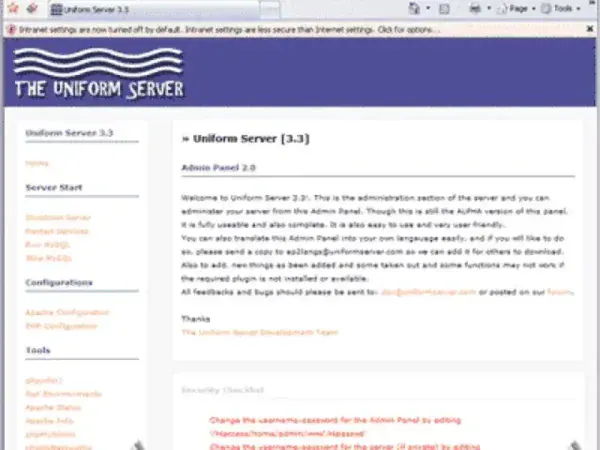
What Is Uniform Server?
Uniform Server is a portable WAMP development environment for Windows that combines a web server, PHP, database support, and management tools into a single package. Instead of separately installing and configuring Apache, PHP, and MySQL, users can start with a preconfigured local server environment.
The portable design is one of its most useful characteristics. The entire server environment can be stored on removable media and used on another compatible Windows computer, making it practical for developers, students, technicians, and anyone who needs a mobile website testing environment.
It can be used to develop and test PHP websites, content management systems, database applications, and other server-side projects without publishing them to the Internet.
What Does the Portable WAMP Package Include?
The software brings together several components normally configured individually when creating a local PHP development server.
- Apache HTTP Server: Provides the web server required to deliver websites and PHP applications through a local browser.
- PHP: Provides server-side scripting support for dynamic websites and web applications.
- MySQL: Provides relational database functionality for websites and applications that require stored data.
- phpMyAdmin: Provides a browser-based interface for managing databases, tables, users, and SQL queries.
- Server Control Panel: Provides a convenient way to start, stop, and manage the included services.
- Portable Configuration: The environment is designed to operate from a removable drive rather than requiring a conventional system-wide installation.
Why Use a Portable Web Server?
A portable development server can be useful when you want to work on websites from more than one computer. Rather than rebuilding your development environment every time, you can keep the necessary server files, website projects, and databases together on a portable storage device.
This approach can be particularly useful for:
- Developing PHP websites locally.
- Testing WordPress and other PHP-based applications.
- Working with MySQL databases without an Internet connection.
- Demonstrating websites in classrooms or presentations.
- Testing website changes before deploying them to a live server.
- Learning Apache, PHP, and MySQL administration.
- Carrying a complete development environment between compatible Windows computers.
Because the server runs locally, websites can normally be accessed through an address such as http://localhost/. This allows developers to test pages and applications without making them publicly accessible.
Key Features
Apache Web Server
Apache provides the HTTP server component used to deliver locally hosted websites. It is widely used in web hosting and development environments, making it useful for testing applications in an environment that resembles a traditional PHP hosting setup.
PHP Development Environment
The bundled PHP interpreter allows developers to create and test dynamic websites and applications locally. PHP files can be placed in the appropriate web directory and accessed through a browser using the local server address.
MySQL Database Support
Database-driven applications can use the included MySQL server to store information locally. This makes the package useful for testing websites that require user accounts, content management systems, configuration data, or other database functionality.
phpMyAdmin Database Management
phpMyAdmin provides a graphical interface for working with MySQL databases. Instead of entering every database command manually, users can create databases, inspect tables, import data, export backups, and execute SQL queries through a web interface.
Portable Operation
One of the biggest advantages is its ability to be carried on removable storage. A developer can keep the server package on a USB flash drive or external hard drive and launch the environment when needed.
Portability does not mean that every application or configuration will automatically work identically on every computer. Windows permissions, drive paths, firewall settings, available ports, and other system differences can affect how a portable server behaves.
Using the Server for Local Website Development
The application can provide a convenient local environment for experimenting with websites before moving them to a production server.
For example, a developer could create a PHP project, place its files inside the local web directory, create a corresponding database, and then access the project through a browser using localhost.
This is especially useful when working with content management systems such as WordPress. A complete site can be developed or tested locally before files and databases are transferred to a live hosting account.
Uniform Server vs Traditional WAMP Installations
Traditional WAMP packages are generally installed directly onto a computer and configured for long-term use on that particular system. A portable WAMP environment takes a different approach by keeping the development stack together in a self-contained directory.
Portability
- Portable WAMP: Designed to be carried on removable storage and launched when required.
- Traditional WAMP: Normally installed on a specific Windows computer and intended for regular use on that machine.
Setup
- Portable environment: Provides the major server components together, reducing the need to configure each component separately.
- Traditional installation: Can provide more conventional system integration but may require additional configuration and maintenance.
Mobility
- Portable environment: Useful for developers who work between different compatible Windows computers.
- Traditional installation: Better suited to developers who primarily work from one workstation.
Resource Usage
The lightweight design makes the package suitable for local development without requiring the infrastructure of a dedicated web hosting server. Actual performance will depend on the computer, storage device, PHP application, database, and number of services being used.
How to Run the Server from a USB Drive
If you want to use the software as a portable development environment, the general process is straightforward:
- Download the portable server package.
- Extract or install the files onto a USB flash drive or external storage device.
- Connect the drive to a compatible Windows computer.
- Launch the included control application.
- Start the Apache and MySQL services.
- Open a web browser and visit http://localhost/.
- Place your website files in the appropriate web directory.
- Create or import a database using phpMyAdmin when required.
- Test the website locally before transferring it to a live server.
When finished, stop the running services before disconnecting the USB drive. This helps prevent database corruption and ensures that files are not being accessed while the storage device is removed.
Can You Run WordPress Locally?
Yes. A portable PHP and MySQL environment can be used to run WordPress locally for development and testing.
After starting Apache and MySQL, you can create a database through phpMyAdmin and place the WordPress files in the local web directory. WordPress can then be installed through the browser using the localhost address.
This can be particularly useful for testing themes, plugins, PHP changes, database migrations, and site redesigns without making changes to a live website.
Security and Production Considerations
Although a local web server can technically be configured to accept connections from other computers, it should primarily be treated as a development and testing environment.
A portable WAMP package should not automatically be considered secure enough for production hosting. If you intend to expose a locally hosted website to the public Internet, additional security configuration, firewall rules, authentication, HTTPS certificates, software updates, and server hardening may be required.
For normal local development, keeping the server accessible only through localhost is generally the safer approach.
Technical Specifications
- Application: Uniform Server
- Category: Portable Web Server / WAMP
- Components: Apache, PHP, MySQL and phpMyAdmin
- License: Freeware / Open Source components
- Supported Operating Systems: Windows
- Portability: Designed for portable use
- Price: Free
- Application Category: Web Development, Web Servers, Utilities
- Editor's Rating: ★★★★★
- Official Website: Uniform Server Project Page
- Download: Uniform Server Download
Frequently Asked Questions
What is Uniform Server?
Uniform Server is a portable WAMP development environment for Windows that combines Apache, PHP, MySQL, and related tools into a self-contained local web server package.
Can Uniform Server run from a USB flash drive?
Yes. The software was designed with portability in mind and can be stored on removable media, allowing the development environment to be carried between compatible Windows computers.
Can I use Uniform Server to test PHP websites?
Yes. Apache and PHP provide the components required to run and test PHP-based websites locally without uploading them to a public web server.
Does Uniform Server include MySQL?
Yes. The package includes MySQL database functionality for applications that require a relational database.
Does Uniform Server include phpMyAdmin?
Yes. phpMyAdmin provides a web-based interface for managing the included database server.
Can I use Uniform Server to run WordPress locally?
Yes. A local PHP and MySQL environment can be used to install and test WordPress without publishing the website online.
Is Uniform Server suitable for production websites?
It is primarily intended for development, testing, and local hosting. A dedicated, properly secured production server is generally a better choice for publicly accessible websites.
Is this portable WAMP software free?
Yes. The project is available as free software, although individual components included in the package may have their own licenses.
What can I use a portable web server for?
It can be used for PHP development, WordPress testing, database development, website demonstrations, offline development, education, and troubleshooting.
Final Thoughts
Uniform Server remains an interesting option for Windows users who want a self-contained web development environment that can be carried between computers. By bringing Apache, PHP, MySQL, and database management tools together, it removes much of the complexity involved in assembling a local PHP server from individual components.
Its biggest advantage is portability. Keeping a complete localhost development environment on a USB flash drive can be convenient for developers, students, technicians, and anyone who needs to demonstrate or test websites away from their primary workstation.
This stand alone local webserver is best viewed as a development and testing platform rather than a replacement for a properly configured production server. For local PHP development, WordPress testing, database work, and portable website demonstrations, however, this lightweight WAMP solution can be a very useful addition to a USB software toolkit.
If you are looking for another portable localhost environment, you can also compare it with XAMPP Portable, which provides a larger all-in-one development stack and is another popular choice for running websites locally.
