
MemPad is a free note-taking tool that can serve as a Portable Diary. It allows you to create a tree like note-taking structure, making it easy to organize daily entries, ideas, or project notes. It comes packed with features to enhance productivity and note organization, including search, drag-and-drop, copy, cut, paste, undo, inserting dates and times, internal file links, external web links, and support for environmental variables to run programs from file links.
Portable Diary | MemPad
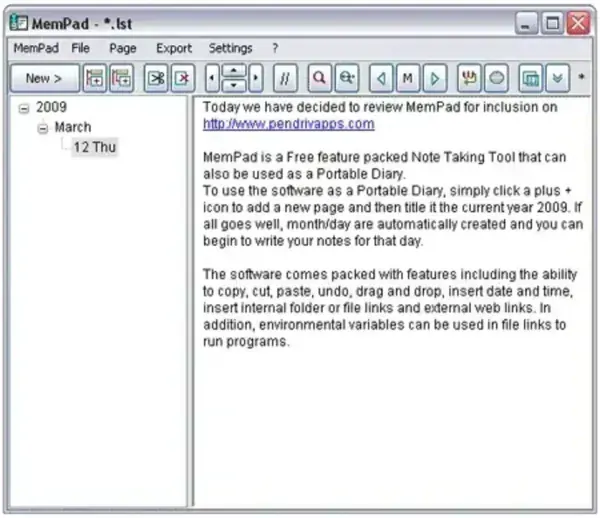
Key Features
- Tree Structured Notes: Organize your notes hierarchically for easy navigation.
- Search Content: Quickly locate notes or text within your entries.
- Text Editing: Supports copy, cut, paste, undo, and formatting options.
- Date & Time Stamps: Insert current date and time into notes for journaling purposes.
- Internal and External Links: Link notes together or open websites and programs directly from your entries.
- Environmental Variables: Run programs or scripts via file links using system variables.
- Portable: Runs directly from a USB drive without installation, making it ideal for use on multiple computers.
Who Should Use MemPad?
- Students and professionals needing a portable journal or diary.
- Writers and creatives organizing ideas and project notes.
- Anyone wanting a lightweight, tree based note-taking solution without installation.
Specifications | Official Site | Download
- Authors Website: Project Page
- License: Freeware
- Extracted Size: Lightweight, under 1 MB
- Supported OS: Windows
- Downloading: You can download MemPad HERE
Final Thoughts
MemPad is a simple yet powerful portable note taking utility that doubles as a personal diary or journal. Its tree like structure, search capabilities, and link support make it a versatile tool for organizing notes, ideas, and projects. Being portable, it is perfect for users who need a lightweight and reliable stand alone diary on the go.
