SepPDF: Free Portable PDF Page Splitter for Windows
SepPDF is a free Windows utility that splits a multi-page PDF into separate files. It can create one PDF per page, divide facing-page layouts into individual pages, or split a document into selected sections. The program is designed for a focused task and does not require a full PDF editing suite when you only need to separate pages.
Split a PDF into Individual Pages or Sections
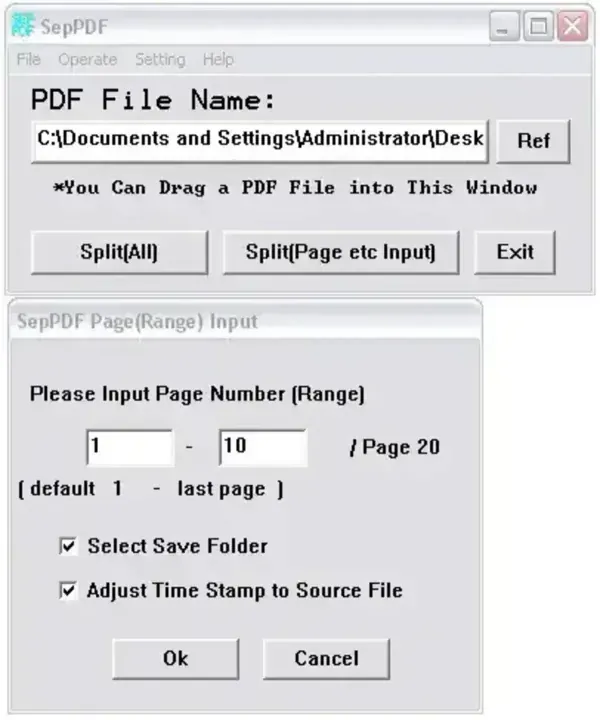
SepPDF can split a document into separate page files and can also handle facing-page layouts where two pages appear side by side in a single PDF page. It can further divide an individual page into two to eight smaller sections, which is useful for oversized scans or pages arranged in multiple panels. This makes it handy for digitized books, scanned documents, and other files that need to be separated into individual pages or sections.
You can choose the output folder and adjust file timestamps. The utility is intended for splitting, not editing the text or images inside a PDF. Keep the original document until you have checked the resulting files and confirmed that the page order and output are correct.
Choose the Right Split Method
Use the all-pages option when you want a separate PDF for every page. Use a page-range option when you need to extract only selected chapters, forms, or appendices. The facing-page function is useful for scanned books where two printed pages were captured together, while the section-splitting function can divide an oversized page into smaller panels.
Before splitting a large document, test a few pages and check the output dimensions, orientation, page order, and readability. If a scanned book has a center gutter or curved pages, splitting a spread may not perfectly separate the text. SepPDF does not perform OCR, so the output remains image-based if the original PDF contains scanned images rather than searchable text.
Portable Use and Compatibility
The developer provides a small standalone Windows application. SepPDF version 3.95 was released on November 21, 2025, and the publisher lists Windows XP, Vista, 7, 8, 10, and 11 as tested systems. The program is useful for routine page extraction, but it does not replace a full PDF editor when you need to modify text, annotate pages, or combine documents in more complex ways. Official SepPDF project page.
SepPDF Specifications
- Developer: ForestH
- Version: 3.95 (November 21, 2025)
- License: Freeware
- Platform: Windows XP through Windows 11 (developer listing)
- Main features: Split PDFs into single pages, separate facing-page scans, divide pages into 2-8 sections, select output folder, adjust timestamps
- Deployment: Standalone executable / portable ZIP
- Editor's Rating: ★★★★☆ (4/5)
- Download: Get SepPDF from the developer's project page
Is SepPDF Worth Using?
SepPDF is a useful single-purpose tool for separating scanned or multi-page PDF documents into smaller files. Its small footprint and straightforward workflow are convenient when you do not need a full PDF editor. Check the output after splitting, especially when working with facing-page scans or documents that must retain a specific page order. For other PDF utilities, browse our portable PDF tools.