
WinMerge is an open source file and folder comparison and merging tool for Windows. This portable differencing and merging utility allows users to visually compare differences or changes between files and directories in a clear, easy-to-understand format. Once differences are identified, the software can be instructed to merge, copy, or synchronize those changes efficiently.
It is especially useful for developers, system administrators, and power users who need to analyze file changes, track revisions, or synchronize folders across systems without relying on complex version control software.
WinMerge | File Comparison and Merging Software
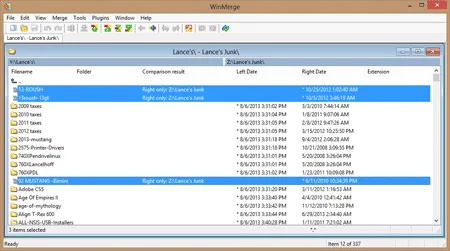
WinMerge provides a powerful visual interface for comparing both files and entire folder structures. Differences are highlighted clearly, allowing users to quickly identify additions, deletions, and modifications.
What Is WinMerge Used For?
The free file comparing application is commonly used for:
- Comparing configuration files and source code
- Synchronizing folders between systems
- Reviewing changes between file revisions
- Merging updates from multiple sources
- Detecting accidental or unwanted file changes
Key Features
- Side-by-Side File Comparison: Compare files or folders visually with clear highlighting of differences.
- Color & Syntax Highlighting: Visual differentiation of changes with syntax highlighting for many file types.
- Multiple Comparison Modes: Supports line based and character-based comparison for precise analysis.
- Folder Comparison & Synchronization: Identify differences between directory structures and sync files accordingly.
- Binary & Image Comparison: Compare non text files including binaries and images.
- Plugin Support: Extend functionality with plugins for additional formats and tools.
- Version Control Integration: Works with systems such as Git and Subversion.
- Unicode Support: Compare and merge files containing non-ASCII characters.
- Customizable Settings: Adjust line endings, encodings, and comparison behavior.
- Portable Availability: Can be run as a portable application for use on USB drives.
Why Use a Portable File Comparison Tool?
Portable file comparing software is ideal for technicians and developers who need a reliable file comparison tool that can stand on its own, without needing Windows installation. Benefits include:
- No system changes or registry modifications
- Perfect for USB based toolkits
- Use on locked down or shared computers
- Consistent behavior across multiple systems
Specifications | Official Site | Download
- Author's Website: Project Page
- Extracted Size: Approximately 7.6 MB
- License: Open Source
- Supported OS: Windows
- Download: You can get this free file comparison and merging tool here:
WinMerge Download
Frequently Asked Questions (FAQ)
Is WinMerge free to use?
Yes, it is completely free and released under an open-source license.
Can WinMerge compare entire folders?
Yes, the free file comparison tool can compare directory structures and highlight differences between folders, including missing, modified, or new files.
Does WinMerge support merging files?
Yes. After comparing files, users can merge changes directly within the interface.
Is there a portable version of WinMerge?
Absolutely. The developer offers a portable version that can be run from a USB drive without installation.
Who should use WinMerge?
It is ideal for developers, system administrators, translators, and anyone who needs to compare or synchronize files efficiently.
Final Thoughts
WinMerge remains one of the most powerful and trusted file and folder comparison tools available for Windows. Its combination of visual clarity, deep comparison options, merging capabilities, and portability makes it an essential utility for anyone managing file changes or multiple versions of data.
For a free, open source, and USB friendly file comparison tool, WinMerge continues to be one of my top choices.