
ExeInfo is a freeware executable information tool that allows users to view detailed information about binary files such as .exe, .dll, .ocx, and drivers. It provides insight into file metadata, including author, file size, creation/modification dates, executable format, header information, and more. This tool is useful for developers, system administrators, or anyone who wants to inspect executable files for security, compatibility, or troubleshooting purposes.
ExeInfo | Executable Information Tool
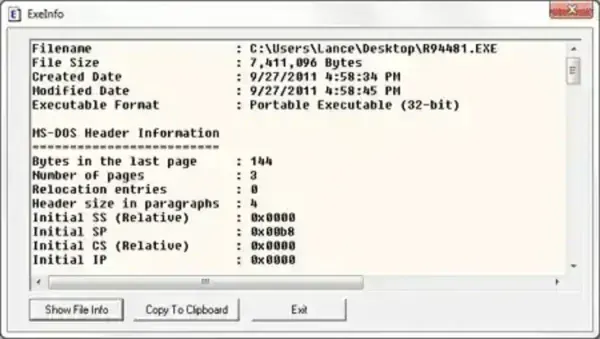
How to Use ExeInfo
- Start the program.
- Click Show File Info and browse to select the file you want to inspect.
- View the detailed results in the interface, or use Copy To Clipboard to copy the information. You can also manually highlight and copy any content.
Key Features
- File Metadata: Displays author, size, creation/modification dates, and more.
- Executable Format: Identifies the file type and its internal structure.
- Header Information: Shows detailed header data for technical analysis.
- Supports Multiple File Types: Works with .exe, .dll, .ocx, and driver files.
- Portable: No installation required; can run directly from a USB drive.
- Lightweight: Only 20 KB extracted, minimal system resources.
Specifications | Official Site | Download
- Author's Website: Project Page
- Author: NirSoft
- License: Freeware / Open Source
- Extracted Size: 20 KB
- Supported OS: Windows
- Download: Get ExeInfo HERE
Frequently Asked Questions (FAQ)
What is ExeInfo used for?
It is used to inspect executable files and libraries (.exe, .dll, .ocx, drivers) to see detailed metadata, headers, and format information. It’s useful for developers, IT professionals, or anyone verifying files.
Is it free?
Yes, it is completely free and available under a Freeware/Open Source license.
Does it require installation?
No, it is portable and can run directly from a USB drive or any folder without installation.
Which file types are supported?
ExeInfo supports .exe, .dll, .ocx, and driver files.
Can I use it on modern Windows versions?
Yes, it works on all modern Windows versions, including Windows 11, 10, and earlier editions.
Final Thoughts
ExeInfo is a simple, lightweight, and highly portable tool for inspecting executable files. Whether you need to verify metadata, analyze headers, or troubleshoot file issues, this utility is ideal for system administrators, developers, and tech enthusiasts.
