
EPM (Era Password Manager) was presented as a portable utility for keeping usernames and passwords in a database protected by a single master password. The original listing described it as a way to carry login details on removable storage instead of memorizing each password.
Important security warning: EPM is a very old software listing, last reviewed here in 2007. I could not verify that the developer still maintains it, that its download is authentic, or that its encryption and password-storage methods meet modern security expectations. Do not use this legacy application to store current passwords, financial logins, recovery codes, or other sensitive credentials.
EPM - Era Password Manager
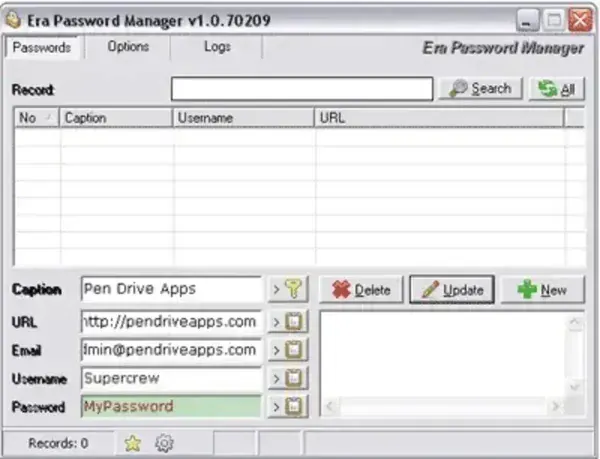
Original Purpose
EPM was designed to keep login names and passwords in one database so a user would need to remember a single master password. The old listing described it as portable and intended for use from a removable device. Those are historical descriptions only; current portability, supported Windows versions, and compatibility have not been verified.
Why You Should Not Rely on EPM Today
Password managers protect highly sensitive information, and their security depends on more than requiring a master password. Encryption algorithms, key derivation, update history, password recovery behavior, and how the application handles stored data all matter. I could not verify these details for this old EPM release, so it would be misleading to describe the program as secure by current standards.
Software that has not been maintained may also lack fixes for vulnerabilities discovered after its release. Even if an old application still launches, that does not establish that its vault format or cryptographic design is safe to use today.
Historical Download
The original PendriveApps listing included a ZIP archive hosted on this site. It is retained here only as a historical file reference, not as a recommendation for managing real credentials. An archived file can be incomplete, modified, or incompatible with current systems; its presence does not verify its authenticity or safety.
If you are researching the old program, do so in an isolated test environment with dummy data. Do not import existing passwords, use a password you rely on elsewhere as the master password, or treat a successful launch as evidence that the application is trustworthy.
Choosing a Password Manager Today
For active password storage, choose a currently maintained password manager with clearly documented encryption, regular security updates, secure recovery and backup guidance, and versions that support your operating systems. Confirm that its portable mode, if offered, behaves as expected and understand where the vault and configuration files are stored. Keep an independent backup of important credentials and test your recovery process before relying on it.
EPM Details
- Original purpose: Store usernames and passwords in a single database
- Historical listing date: 2007
- License: Listed as freeware in the original entry
- Portability: Previously described as portable; not currently verified
- Developer and maintenance status: Current status unverified
- Security status: Encryption and modern security suitability could not be verified; not recommended for current credentials
