
WebPassView is a free internet web browser password recovery tool. This freeware portable lost password recovering software or utility can be used to reveal or recover lost or forgotten login usernames and passwords from all of the most popular browsers.
Reveal Web Browser Passwords | WebPassView
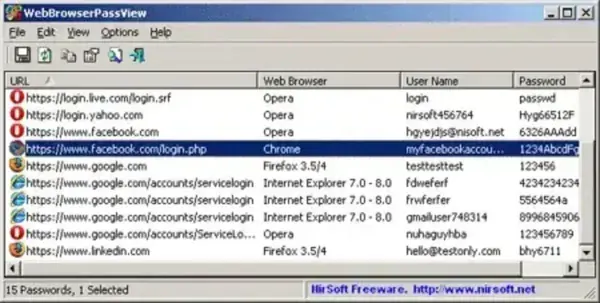
WebBrowserPassView is a utility developed by NirSoft that allows users to retrieve and view passwords stored by various web browsers on a Windows system. It is designed to help users recover their own passwords when forgotten.
Its features include:
- Password Recovery: Can recover passwords from popular web browsers including Internet Explorer, Microsoft Edge, Mozilla Firefox, Google Chrome, and Safari.
- Browser Compatibility: It supports a wide range of web browsers, making it versatile for users who use multiple browsers.
- Export Options: Allows users to export the recovered passwords into various formats such as HTML, XML, or plain text, facilitating easy backup or documentation.
- Filtering Options: Users can filter and search for specific passwords based on criteria such as browser type, website, or username.
- Command-Line Support: For more advanced users, it provides command-line options for automation and scripting purposes.
Quickly reveal internet usernames and passwords stored within Mozilla Firefox, Google Chrome, Internet Explorer, and Opera web browsers. Recovered information can be exported or saved to a text, html, csv, or xml file.
WebBrowserPassView Specs | Official Site | Download
- Website: Project Page
- Developer: Created by NirSoft
- Supported Operating System: Windows
- Extracted File Size: 340 KB
- License: Freeware
- Downloading: You can find this web browser password viewer here:
WebBrowserPassView Download
Frequently Asked Questions (FAQ)
Is WebPassView a portable application?
Yes, it is fully portable and does not require installation. It can be run directly from a USB flash drive or removable storage.
Does WebPassView work on all Windows versions?
It supports most Windows versions, including Windows 7, 8, 10, and 11. It may also work on older Windows systems depending on browser support.
Can WebPassView recover passwords from all browsers?
It supports many popular browsers such as Chrome, Firefox, Edge, Internet Explorer, and Opera. Support depends on whether the browser stores passwords locally and whether they are accessible to the current user account.
Does WebPassView decrypt passwords?
The tool displays passwords that are already stored and encrypted by the browser for the currently logged-in user. It does not bypass browser security or recover passwords from other user accounts.
Is using WebPassView legal?
It is intended for recovering your own stored credentials. Using it to access passwords belonging to other users without permission may violate privacy or local laws.
Can recovered passwords be exported?
Yes. Passwords can be exported to multiple formats including text, CSV, HTML, and XML for backup or documentation purposes.
Final Thoughts on WebPassView
WebPassView remains a practical utility for users who need quick access to credentials already saved within their own web browsers. Its lightweight, portable design makes it especially useful for technicians, system administrators, and advanced users who rely on removable tools for troubleshooting or recovery tasks.
Because the application works entirely offline and requires no installation, it fits well into secure environments where installing software is restricted. The ability to export recovered data in multiple formats further adds to its usefulness for documentation or migration purposes.
As with any password revealing utility, it should be used responsibly and only on systems where you have permission to access stored credentials. When used appropriately, it remains one of the most efficient browser password viewers available in a portable format.