
Wireless Network Watcher is a small utility that scans your wireless network and displays the list of all computers and devices that are currently connected to your network. This easy-to-use WiFi monitor scans your local network and quickly shows a list of connected devices, such as computers, smartphones, routers, smart TVs and more. It is a useful tool to monitor wireless activity and detect unknown connections.
Wireless Network Watcher | View Connected WiFi Devices
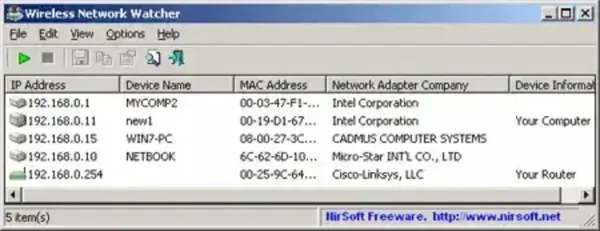
Developed by NirSoft, Wireless Network Watcher scans your local network and displays detailed information about every detected device. This includes desktops, laptops, phones, printers, gaming consoles, smart TVs, tablets, and other network enabled hardware connected to your WiFi network.
Unlike packet sniffers or advanced monitoring suites, the tool focuses on quickly identifying connected devices rather than capturing network traffic. Its simplicity, portability, and lightweight design make it an excellent utility for home users, technicians, and IT administrators who need a fast overview of local wireless network activity.
Because the program is completely portable, it can be stored and run directly from a USB flash drive without installation, making it useful for troubleshooting multiple systems or networks on the go.
How Wireless Network Watcher Works
The utility scans your local IP address range and attempts to identify active devices currently connected to your network. When devices respond, the program gathers available network information and displays it in an organized list.
The scanner can display:
- IP address
- MAC address
- Device name or hostname
- Network adapter manufacturer
- Device detection status
This makes it easy to identify unfamiliar devices, verify connected hardware, or troubleshoot network congestion and connectivity issues.
The program works particularly well on home WiFi networks and small office environments where users need quick visibility into active devices.
Key Features
- Connected Device Detection: Quickly identify devices connected to your wireless network.
- Displays Device Information: View IP addresses, MAC addresses, hostnames, and adapter manufacturers.
- Portable Utility: Runs directly without installation.
- Lightweight: Extremely small footprint with minimal resource usage.
- Export Support: Save scan results as HTML, XML, CSV, or text files.
- Sound Alerts: Optional alerts when new devices are detected.
- Custom IP Range Scanning: Configure manual IP scanning ranges.
- Simple Interface: Easy enough for beginners while still useful for technicians.
Common Uses
- Checking which devices are connected to your WiFi
- Finding unknown or unauthorized devices
- Troubleshooting slow network performance
- Verifying that devices are online and reachable
- Monitoring home or office wireless activity
- Portable network diagnostics from a USB drive
How to Use Wireless Network Watcher
- Download the ZIP archive using the link below.
- Extract the contents to a folder or USB flash drive.
- Run
WNetWatcher.exe. - The utility will automatically scan your wireless network.
- Review the detected devices and network details displayed in the results window.
- Optionally export the results for documentation or analysis.
Most scans complete within seconds depending on network size and router response time.
Important Notes
- Detection accuracy may vary depending on firewall settings, router configuration, and whether devices respond to network requests.
- Some devices may appear without hostnames if name resolution is unavailable.
- The tool does not block devices or manage network access. Unauthorized devices must be managed through your router settings.
- Some antivirus programs may flag NirSoft tools because of their network scanning behavior. These are generally false positives when downloaded from the official source.
Frequently Asked Questions
What does Wireless Network Watcher do?
It scans your local network and displays devices currently connected to your wireless network along with identifying information such as IP address, MAC address, and hostname.
Can it detect unknown devices on my WiFi?
Yes. The utility can help identify unfamiliar devices connected to your network, which may help detect unauthorized access.
Does Wireless Network Watcher monitor internet traffic?
No. It does not capture or analyze network traffic. It only scans and lists connected devices.
Is Wireless Network Watcher portable?
Yes. The utility runs directly from a folder or USB flash drive without installation.
Can it work on Windows 11?
Yes. It supports Windows XP through Windows 11.
Is Wireless Network Watcher safe to use?
Yes. It is developed by NirSoft, a trusted provider of Windows utilities. Downloading from the official source is recommended.
Specifications | Official Site | Download
- Author's Website: Official Project Page
- Developer: NirSoft
- License: Freeware
- Supported Operating Systems: Windows XP, Vista, 7, 8, 10, 11
- Rating: 4 Star
- File Size: Approximately 400 KB to 700 KB (varies by version)
- Category: Network Utilities
- Portable: Yes
- Downloading: Download Wireless Network Watcher
Final Thoughts
Wireless Network Watcher is a fast, lightweight, and highly practical utility for viewing devices connected to your WiFi network. Its simple interface and portable design make it especially useful for quickly identifying active devices, troubleshooting wireless issues, or checking for unauthorized connections.
While it does not provide advanced intrusion detection or packet monitoring features, its speed, ease of use, and portability make it an excellent addition to any USB troubleshooting toolkit for home users, technicians, and network administrators alike.
