
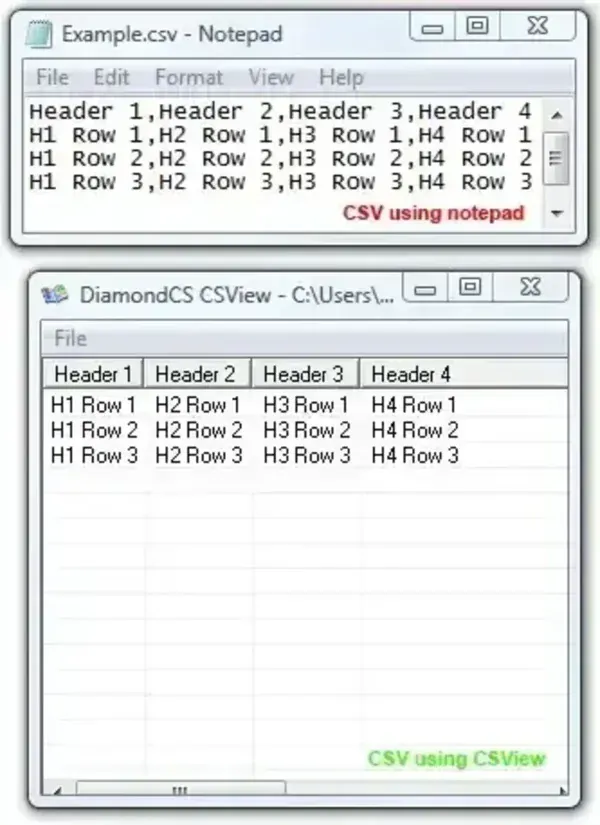
DiamondCS CSView is a small, legacy Windows utility that was designed to display comma-separated values (CSV) files in a readable table-like layout. Unlike opening a CSV file as plain text, a dedicated viewer can make it easier to scan rows and columns. The original PendriveApps listing described CSView as a tiny, portable freeware tool, but the original developer download is no longer verified as available.
Legacy software notice: CSView version 1.0 was listed by third-party software archives in 2005. The original DiamondCS website is not confirmed as an active source for this utility, and compatibility with current Windows versions has not been verified. Treat CSView as a historical software listing, not a current recommendation or a verified download.
DiamondCS CSView - CSV File Viewer
What Is a CSV File?
CSV stands for comma-separated values. It is a plain-text format commonly used to exchange tables between spreadsheets, databases, and other applications. Each record usually occupies a line, with fields separated by a delimiter such as a comma. Despite the name, valid CSV files can also contain quoted fields, commas inside quoted values, and line breaks within quoted fields, so parsing a CSV file is not always as simple as splitting each line at every comma.
A spreadsheet application or dedicated CSV viewer can display records in rows and columns, making larger files easier to inspect than in a basic text editor. When opening files from an unfamiliar source, remember that CSV content can contain formulas that spreadsheet programs may interpret when opened.
CSView Availability and Compatibility
Third-party software archives identify DiamondCS CSView as version 1.0 and date its listing to 2005. The original PendriveApps listing described it as approximately 37 KB and portable, but these are historical details and have not been independently verified against a current release. There is no verified current download link for the original utility on this page.
Because the software is old, its behavior on Windows 10 and Windows 11 is unknown. Do not rely on it for important data or assume that it handles modern CSV encodings, large files, quoted fields, or unusual delimiters correctly without testing it first.
Alternative CSV Viewer
If you need a CSV viewer today, one option to evaluate is CSVFileView on SourceForge. Its project page describes it as a Windows tab-delimited file viewer and converter, and its file listing includes packages updated in March 2025. It is a separate application, not a newer version of DiamondCS CSView. Review its features, file details, and publisher information before downloading.
Safety and Data Handling
Only download legacy utilities from sources you trust. Scan files before running them, and do not treat an old freeware label as proof that a file is safe or that the software remains supported. Keep an untouched copy of important CSV data before converting or editing it. If a CSV contains private information, avoid uploading it to an online viewer unless you understand how that service handles your data.
DiamondCS CSView Details
- Purpose: View CSV data in rows and columns
- Original developer: Diamond Computer Systems (DiamondCS)
- Historical version: 1.0
- Historical license: Listed as freeware by third-party archives
- Portability: Previously described as portable; not recently verified
- Current status: Legacy software; current download and Windows compatibility unverified
