
QtWeb is a lightweight, Open Source Portable Web Browser designed to run directly from a USB flash drive without installation. This stand alone browser is ideal for users who need a fast, minimal, and privacy respecting way to browse the web on shared or public computers.
Because QtWeb does not require installation and stores almost all data locally within its own folder, it leaves virtually no footprint on the host system, with the exception of downloaded files. This makes it especially useful for privacy conscious users, technicians, and travelers who need a portable browsing solution they can trust.
Built on Nokia's Qt framework and using the WebKit rendering engine; the same engine historically used by Apple Safari and early versions of Google Chrome this portable internet browser delivers reliable standards compliant web rendering in a very compact executable.
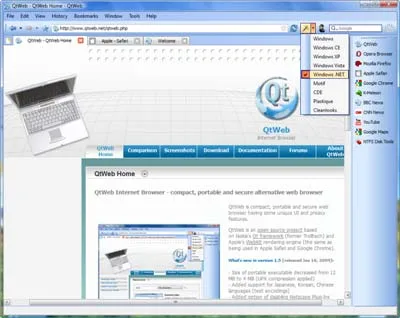
QtWeb Portable Browser Screenshot
What Is QtWeb?
QtWeb is a minimalist web browser created as a demonstration of what could be achieved using the Qt application framework combined with the WebKit rendering engine. Unlike full featured browsers such as Firefox or Chrome, it focuses on speed, simplicity, and portability rather than extensions, accounts, or cloud integration.
The application launches as a single executable and does not modify system files or require administrative privileges. This makes the portable internet browser particularly well suited for use on locked down systems, school or library computers, or environments where installing software is not permitted.
Although development has been discontinued, it remains functional for basic browsing tasks and continues to be used as a lightweight portable browser alternative.
Key Features
- Portable and Standalone: Runs directly from a USB flash drive with no installation required
- Privacy Focused Design: Leaves no browsing traces on the host system, aside from downloaded files
- Open Source Software: Source code was publicly available, allowing transparency and inspection
- Qt + WebKit Engine: Uses the same rendering technology once shared by Safari and Chrome
- Lightweight and Fast: Minimal memory and CPU usage compared to modern browsers
- Simple Interface: Clean, uncluttered UI ideal for distraction-free browsing
- No Account or Sync Requirements: Works entirely offline with no sign-in or tracking
Common Use Cases
- Browsing the web on public or shared computers
- Carrying a portable browser on a USB drive
- Using older or low-spec hardware where modern browsers are too heavy
- Privacy-focused browsing without cookies or user profiles stored on the host PC
- Emergency or backup browser for troubleshooting systems
Limitations to Be Aware Of
QtWeb is best suited for basic browsing. Because it is no longer actively maintained, users should be aware of the following limitations:
- No modern extension or add on support
- Limited compatibility with newer web standards and complex web apps
- No built in sandboxing or modern security hardening found in current browsers
For sensitive tasks such as online banking or account logins, a modern, actively maintained browser is recommended.
Specifications and Download
- Author's Website: Archived Project Page
- Framework: Qt
- Rendering Engine: WebKit
- License: Open Source
- Operating System: Windows
- Download: Get the last standalone executable: QtWeb Portable
Frequently Asked Questions (FAQ)
Is QtWeb really portable?
Yes, it runs as a single executable and does not require installation, making it suitable for use directly from a USB flash drive.
Does QtWeb leave data behind on the computer?
It does not store browsing history or settings on the host system. Only downloaded files may remain in the chosen download folder.
Is QtWeb still actively developed?
No. Development has been discontinued, but the browser remains usable for basic web browsing tasks.
Is QtWeb safe to use?
It is best used for general browsing. Because it lacks modern security updates, it is not recommended for sensitive activities such as online banking.
Final Thoughts
QtWeb remains a solid choice for users who need a truly lightweight, portable web browser that prioritizes simplicity and privacy. While it cannot replace modern browsers for complex web applications, it excels as a compact, stand alone no installation browsing tool that can be carried anywhere on a USB drive.
For technicians, privacy focused users, or anyone needing a fast backup browser that lea