
Magical Jelly Bean KeyFinder is a popular, portable, and free Windows product key recovery tool. It helps users locate lost or forgotten software activation keys for Microsoft Windows, Microsoft Office, and select third-party applications. Whether you are reinstalling Windows, migrating systems, or recovering licenses from older or damaged machines, this lightweight utility scans the Windows Registry to retrieve product keys quickly and safely.
Because it runs without installation, Magical Jelly Bean KeyFinder is ideal for keeping on a USB flash drive for system recovery, diagnostics, or troubleshooting.
Magical Jelly Bean: Windows Product Key Finder
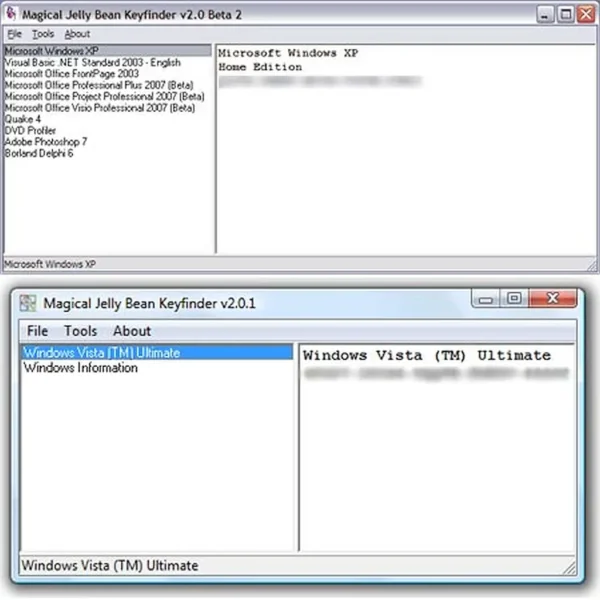
Magical Jelly Bean KeyFinder scans the Windows Registry to locate stored license information. Recovered keys can be saved, copied, or printed for future use. While modern Windows versions may use digital licenses tied to hardware or Microsoft accounts, this tool still works effectively for retrieving keys from older systems or offline registry hives.
7 Reasons Why Magical Jelly Bean KeyFinder Is a Must Have
- Free to Use – Completely free for personal and professional recovery, with no feature restrictions.
- Extremely Portable – No installation needed. Run it directly from a USB drive or folder.
- Windows Product Key Recovery – Recovers keys from legacy and modern Windows systems.
- Microsoft Office Support – Retrieves product keys for older Office versions such as XP, 2003, 2007, and 2010.
- Offline Registry Scanning – Extract keys from non-bootable systems using offline registry hives.
- Lightweight & Fast – Under 1 MB in size and runs instantly, even on older hardware.
- Trusted for Over 20 Years – First released in 2001, widely used by IT professionals and technicians.
Key Features
- Portable Execution: Runs without installation from a USB flash drive.
- Fast Registry Scanning: Quickly locates Windows and Office license data.
- Microsoft Office Product Support: Recovers keys for select Office versions.
- Offline Recovery: Extract keys from non-bootable machines.
- Minimal Footprint: Tiny, lightweight, and low resource usage.
Supported Windows Versions
- Best results on Windows XP, Vista, 7, and older systems.
- Seems to work fine on Windows 8, 10, and 11, though some machines may show OS as an earlier edition (e.g., Windows 11 appearing as Windows 10 Enterprise).
- Supports many Windows Server editions.
How to Use Magical Jelly Bean KeyFinder
- Extract the ZIP archive to a folder or USB drive.
- Run the executable file (no installation required).
- Allow the program to scan the system registry for keys.
- Copy, save, or print the recovered product keys.
Legal Usage Notice
Recovering product keys for software you legally own is permitted. Extracting keys from pirated or unauthorized software violates licensing agreements. Always use responsibly.
Specifications | Official Site | Download
- Developer: JellyBean Software
- Official Website: MagicalJellyBean.com
- License: Freeware
- Supported OS: Windows XP through 11, and Windows Server editions
- First Released: 2001
- File Size: Under 1 MB
- Download: Download Magical Jelly Bean KeyFinder
Final Thoughts
Magical Jelly Bean KeyFinder remains one of the most reliable product key recovery tools available. Its small size, portability, and long-standing reputation make it a great addition to any USB recovery toolkit. While digital licenses on modern Windows versions can sometimes limit key retrieval, this tool continues to excel with older systems, Office keys, and offline registry extraction scenarios. For another serial key finding option, you might want to check out Product Key Finder which can detect and recover over 200 different types of serial keys beyond just Microsoft software.
