
IObit Uninstaller is a free software uninstaller for Windows, created by IObit. It provides a faster, more reliable alternative to the built in Windows Add or Remove Programs tool, allowing you to uninstall unwanted programs, browser toolbars, and plug-ins quickly. Its portable design means you can run it directly from a USB drive, making it ideal for technicians, IT professionals, or users who want to maintain a clean, optimized PC without installing extra software.
IObit Uninstaller | Free Software Removal Tool
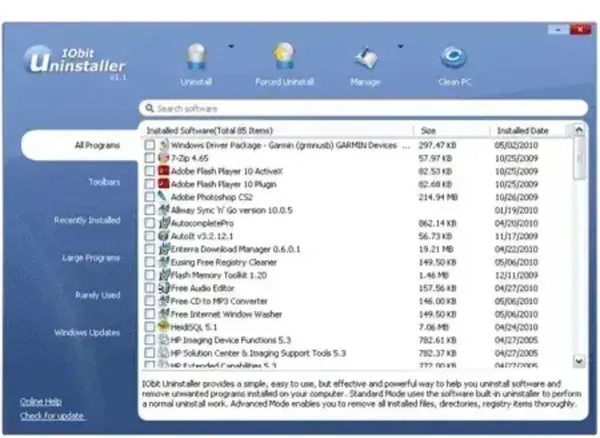
IObit Uninstaller is designed to remove stubborn programs that may not uninstall cleanly with Windows default tools. It can also remove browser toolbars, add-ons, and plug-ins that are often difficult to track down manually. With its portable format, IObit Uninstaller is a convenient addition to any USB toolkit for PC maintenance and troubleshooting.
Key Features
- Quick Uninstall: Remove unwanted applications faster than the standard Windows method.
- Browser Toolbar & Plugin Removal: Detect and remove toolbars, add-ons, and plugins for all major browsers.
- Force Uninstall: Remove programs that resist standard uninstall attempts, including leftover files and registry entries.
- Portable Application: No installation required—run directly from a USB flash drive.
- Lightweight Tool: Extremely small file size (under 1 MB) and minimal system resource usage.
- Safe & Reliable: Designed to preserve system stability while fully removing selected programs and their remnants.
Why Use IObit Uninstaller?
Using a dedicated uninstaller ensures your system stays clean and efficient. Programs left behind can cause clutter, registry bloat, and slower PC performance. IObit Uninstaller is especially useful for:
- Removing stubborn programs or partially installed software
- Cleaning up leftover files and registry entries
- Uninstalling browser toolbars, add-ons, and plugins
- Portable PC maintenance from USB drives or technician toolkits
- Maintaining system stability and freeing disk space
How to Use IObit Uninstaller
- Download the portable version of IObit Uninstaller and extract it to a USB drive or local folder.
- Run IObitUninstaller.exe—no installation is needed.
- Select the program or browser add-on you want to remove from the list.
- Click "Uninstall" to remove the program safely and completely.
- Use "Force Uninstall" for stubborn programs or leftover files.
- Optionally, review leftover files and registry entries and remove them to free up space.
Specifications and Download
- Program Size: 676 KB
- License: Freeware
- Website URL: Official Page
- Supported OS: Windows XP, 7, 8, 10, 11
- Rating: 4 Star
- Download: Download IObit Uninstaller
Frequently Asked Questions (FAQ)
Does IObit Uninstaller remove leftover files?
Yes, it scans for leftover files and registry entries after uninstallation and allows you to remove them.
Can it remove stubborn programs?
Yes, the "Force Uninstall" feature helps remove programs that resist standard uninstallation.
Is IObit Uninstaller free?
Yes, it is completely free to use for personal and professional purposes.
Final Thoughts on IObit Uninstaller
IObit Uninstaller is a reliable, lightweight, and portable solution for managing installed software and browser add ons on Windows. Its ability to remove stubborn programs, clean leftover files makes it an essential tool for IT technicians, system administrators, and everyday users looking to keep their PCs clean and optimized. Whether performing routine maintenance or troubleshooting difficult installations, it remains one of the most practical free software uninstallers available.