Clicky Gone Portable - Hide Open Windows
Clicky Gone Portable is a Windows window-management utility that can temporarily hide selected application windows without closing the programs. It can hide a window from the desktop and taskbar, place hidden windows in the system tray, and restore them later from its menu. This can help reduce desktop clutter or quickly move a private window out of view while keeping the application running.
The program includes configurable keyboard and mouse shortcuts, a Hide All/Show All command, and a Boss Mode feature that hides the active window and can mute its sound. It also provides options to run hidden applications in the background, adjust process priority, keep windows on top, and apply transparency to inactive windows. Hidden applications continue running, so downloads, background tasks, and other work can continue while the window is out of sight.
Clicky Gone 1.4.4.1 Rev 2 is available as a PortableApps package. The package was last updated on June 13, 2012, and the original SourceForge project was last updated in March 2013. PortableApps lists support through Windows 11, but the age of the software means compatibility with current Windows builds should be tested rather than assumed.
Clicky Gone Portable: Hide Open Windows
Clicky Gone Features
- Hide selected windows: Hide an application window from the desktop and taskbar without closing the program.
- Hide All and Show All: Quickly hide all eligible windows and restore them later.
- Boss Mode: Hide the active window and optionally mute its sound with a configurable keyboard shortcut.
- System tray recovery: Place hidden windows in the system tray so they can be restored individually.
- Click and Hide: Use a configurable key combination and mouse click to select the window to hide.
- Run hidden applications in the background: Keep programs running while their windows are hidden.
- Process priority: Change the priority of selected application processes from the window menu.
- Always on top: Keep selected windows above other desktop windows.
- Transparency effects: Apply a fade effect to inactive windows to make the active window easier to focus on.
- Portable package: Run the PortableApps edition from removable storage without a conventional installation on the host computer.
How to Hide and Restore Windows
- Download the Clicky Gone Portable package from PortableApps.com and extract or install it to your USB drive.
- Launch Clicky Gone from the portable folder.
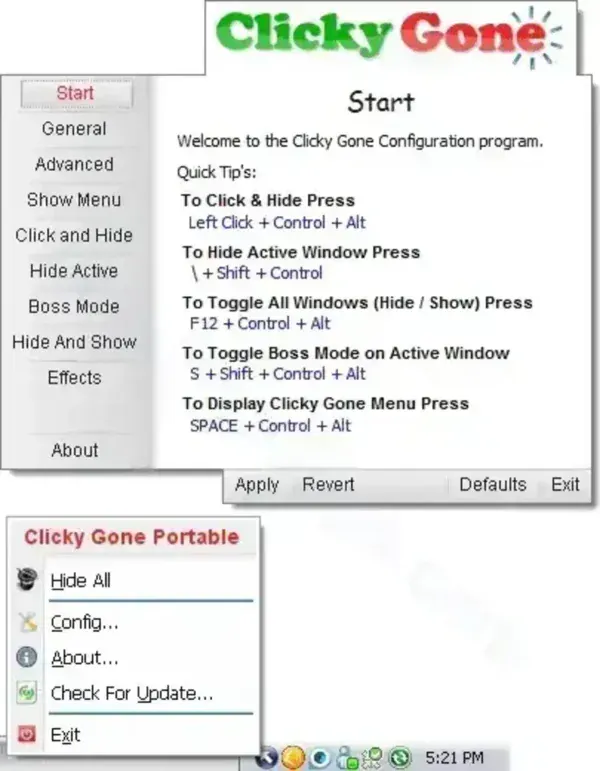
- Open its configuration menu to review the default keyboard and mouse shortcuts.
- Use the configured Click and Hide shortcut to select a window, or use Boss Mode to hide the active window.
- Restore an individual window from the Clicky Gone system tray menu, or use Show All to restore hidden windows.
The default PortableApps package shortcut uses Ctrl+Alt with a left-click to hide a selected window. The system tray menu provides access to hidden windows, configuration, Hide All, Show All, and Exit. Review the shortcut settings before use so they do not conflict with keyboard commands in other applications.
What Happens to Hidden Applications?
Clicky Gone hides application windows; it does not close the programs or stop their processes. Hidden applications can continue running in the background, which is useful when you want to clear the desktop without interrupting a download or other task. You can optionally lower a hidden application's process priority to reduce its impact on the foreground application.
Privacy and Security Limitations
Hiding a window is not a security feature. The application remains open and its data remains available to the logged-in Windows session. A hidden window may still be accessible through other system tools or by someone who knows how to restore it. Do not use Clicky Gone as a substitute for locking Windows, signing out, or protecting sensitive information with account permissions and encryption.
If you are stepping away from a computer, use the Windows lock screen. If you are using a shared or public PC, close sensitive applications and sign out of accounts rather than relying on hidden windows.
Legacy Status and Compatibility
Clicky Gone's latest PortableApps package is version 1.4.4.1 Rev 2, dated June 13, 2012. The original SourceForge project has not had a new release since March 2013. PortableApps lists Windows XP, Vista, 7, 8, 10, and 11 as supported, but the software has not been updated recently. Test it on your current Windows version before depending on it.
Specifications and Download
- Current package: Clicky Gone Portable 1.4.4.1 Rev 2.
- Developer: Alan Howie.
- License: Open source (GPL).
- Package size: Approximately 1 MB download, 2 MB installed.
- Last PortableApps update: June 13, 2012.
- Platform: Windows; current compatibility should be tested.
- Editor's Rating: ★★★☆☆ (3/5)
- PortableApps page: Clicky Gone Portable.
- Download: Download Clicky Gone Portable.
- Original project: Clicky Gone on SourceForge.
Final Thoughts
Clicky Gone Portable offers a quick way to hide selected application windows and restore them later, with useful shortcuts and system tray controls. Its age is a consideration on modern Windows systems, and hiding a window should never be treated as protecting the information inside it. Use Windows session locking for actual privacy and security. Browse our general flash drive apps collection for more portable tools.