
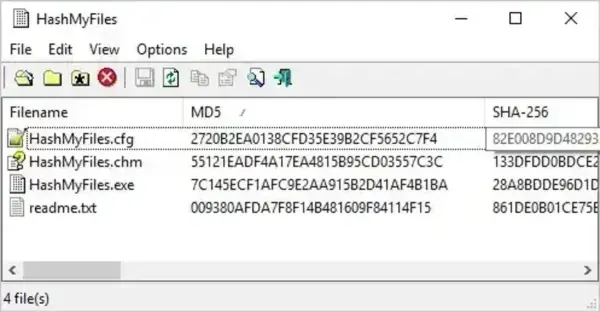
HashMyFiles is a portable, free checksum calculator designed to quickly generate and verify file hashes without installation. This lightweight hash checker calculates MD5, SHA-1, SHA-256, and CRC32 values for one or multiple files, making it ideal for file integrity verification, malware checks, and download validation. It can process individual files, entire folders, or multiple directories in a single scan, making it a practical choice for USB-based troubleshooting and forensic workflows.
Checksum Calculator | HashMyFiles
What Is This Portable Checksum Calculator?
This free file hash verification utility from NirSoft allows users to calculate cryptographic checksums for files stored on a local system, USB flash drives, and external storage devices. File hashes, also known as checksums, are commonly used to confirm file authenticity, detect corruption, and verify that files have not been altered.
Because this checksum verification tool runs entirely offline, it is well suited for secure environments and air gapped systems. Its portable design makes it a strong addition to any USB toolkit used by IT technicians, system administrators, and security professionals.
Key Features and Capabilities
This lightweight file integrity checker is built for speed, accuracy, and ease of use. All calculated hash values are displayed in a sortable table, making it easy to compare multiple files at a glance.
- Multiple Hash Algorithms: Supports MD5, SHA-1, SHA-256, and CRC32 checksum algorithms commonly used for software download verification.
- Batch File Hashing: Calculate checksums for multiple files or entire folders in a single operation.
- File Integrity Verification: Compare calculated hash values to known good checksums to detect tampering or file corruption.
- Detailed File Information: Displays file name, full path, file size, and hash values for accurate auditing.
- Explorer Right Click Hashing: Optional Windows Explorer context menu integration for on demand checksum checks. The portable tool must remain accessible for this feature to work.
- Exportable Checksum Reports: Save results in HTML, XML, CSV, or plain text formats for documentation and forensic analysis.
- Command Line Hash Support: Includes CLI functionality for scripted and automated checksum verification tasks.
- No Installation Required: Runs directly from a USB drive or removable storage with no system changes.
- Broad Windows Compatibility: Compatible with Windows 2000 through Windows 11, including server editions.
Common Uses for File Hash Checking
File checksum tools are commonly used to verify downloaded software, confirm backup integrity, and ensure files transferred via USB drives remain unchanged. Matching a calculated hash against a published checksum helps confirm that a file is complete, authentic, and safe to use.
Specifications and Downloading
Author Website: Project Page
Developer: NirSoft
Extracted Size: 104 KB
License: Freeware
Supported OS: Windows 2000, Windows XP, Windows Server, Windows Vista, Windows 7, Windows 8, Windows 10, and Windows 11
Download: You can get this portable file hash checker here:
Download HashMyFiles
My Final Thoughts
I feel this portable checksum calculator offers a fast and reliable way to verify file integrity without installing software. With support for multiple hash algorithms, batch file hashing, exportable reports, and command line operation, it is well suited for checking software downloads, validating USB transfers, and performing basic digital forensics. Its small footprint and offline operation make it an excellent addition to any portable USB toolkit.
If you find this checksum verification tool useful, you may also want to explore Hash Generator, another portable utility for creating and comparing file hashes: