
Green Browser is a lightweight, portable web browser with a tabbed interface and customizable skins. It functions like a blend of Internet Explorer and Google Chrome, offering a simple, fast, and efficient way to browse the web without installing anything on your computer.
Green Browser Portable
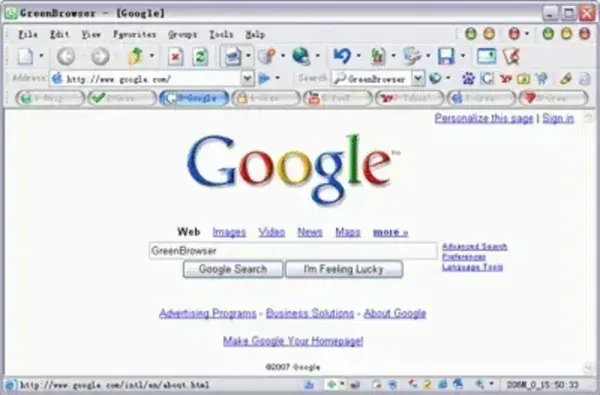
This portable internet browser is designed to run standalone, making it an excellent alternative to major browsers like Chrome, Firefox, Microsoft Edge, and Opera. Because it's portable, you can carry it on a USB flash drive and launch it from any Windows PC, complete with your bookmarks, settings, search history, and saved tabs.
Why Use Green Browser as a Portable Web Browser?
Green Browser is built with energy efficiency and user convenience in mind. It uses minimal system resources, includes an auto-hide feature to reduce screen clutter, and incorporates a low power consumption mode, ideal for laptop users.
Some of its most notable features include:
- Tabbed browsing – Open and manage multiple web pages simultaneously
- Built-in ad blocker – Blocks popups and annoying ads
- Auto form filler – Automatically fills login and form data
- Download manager – Keep track of your downloads within the browser
- Proxy support – Configure and use browser-based proxies
- Favorites manager – Save and organize bookmarks
- Custom skins – Personalize your browser's appearance
- External toolbar – Access additional tools with ease
Whether you're a privacy-focused user, a student, technician, or someone frequently working across multiple PCs, Green Browser gives you a consistent and clutter-free browsing experience.
Features
- License: Freeware
- Platform: Windows (XP, Vista, 7, 8, 10)
- Initial Size: Approx. 3.2 MB extracted
- Portable: Yes – Run from USB or external drive without installation
- Download: Download Green Browser Portable
- Developer Site (Archived): MoreQuick Project Page
How to Use Green Browser from a USB Drive
- Download the ZIP archive from the link above
- Extract the contents to your USB flash drive or external storage
- Launch the executable file
GreenBrowser.exe - Start browsing – all history, settings, and bookmarks are saved within the same folder
Running from a portable folder can reduce changes to the host system, but it does not guarantee that no traces remain. Windows, security software, and other applications may still create logs, temporary files, or activity records.
Final Thoughts
Green Browser is legacy software. Its last release dates to 2016, and it uses the Internet Explorer Trident engine. It should not be recommended for everyday or sensitive browsing on internet-connected systems. Consider it only for historical interest or controlled compatibility testing.
It's particularly useful in situations where installation is not allowed, or for keeping a personal, private browser handy on a flash drive.
