
Text to Speech Converter via SAPI is a free, portable utility created by kyrathaba of Kyrathasoft. It allows users to convert text from .txt files into audio using Microsoft's Speech Application Programming Interface (SAPI). This makes it a practical tool for producing auditory versions of written content, whether for accessibility, workflow optimization, or personal use.
Text to Speech Converter via SAPI - Free Text to Audio Software
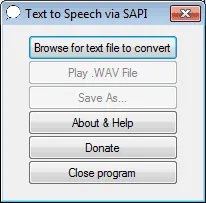
Many text to speech programs leverage Microsoft SAPI, which provides developers with advanced voice synthesis capabilities. SAPI supports multiple languages, accents, and dialects, and allows for highly customizable audio output. Because it requires less input data than some other TTS engines, SAPI-based converters like this one are lightweight, efficient, and easy to use.
Key Features
- Text to Audio Conversion: Converts text from .txt files into a .wav audio file.
- Portable: Standalone executable that can run from a USB flash drive without installation.
- SAPI Support: Utilizes Microsoft SAPI voices for natural-sounding speech output.
- Wide Compatibility: Output .wav files can be played in any media player supporting WAV format.
- Lightweight: Very small file size (~626 KB).
- Freeware/Donationware: Completely free to use, with optional donations.
Why Use This Text to Speech Converter?
This portable TTS utility is ideal for students, educators, content creators, or anyone who wants to convert text to spoken audio quickly. It's also useful for accessibility purposes, helping visually impaired users listen to written content. Its simplicity, efficiency, and SAPI integration make it highly reliable for basic text-to-audio tasks.
Specifications | Official Site | Download
- Developer: kyrathaba (Kyrathasoft)
- Extracted Size: ~626 KB
- License: Freeware/Donationware
- Platform: Windows
- Official Website: Archived Project Page (project appears inactive)
- Direct Download:
Free Text to Speech Converter Download
Frequently Asked Questions
Is Text to Speech Converter via SAPI portable?
Yes, it is a standalone executable that can run from a USB flash drive, with no installation required.
Which voices are available?
The program uses Microsoft SAPI voices installed on your Windows system. You can select from the available languages, accents, and voices.
Can it convert large text files?
Yes, it can handle standard text files. However, extremely large files may require splitting for optimal performance.
What audio format is generated?
It generates standard WAV files, which are compatible with virtually all media players.
Final Thoughts
Text to Speech Converter via SAPI is a lightweight, portable, and effective solution for converting text into audio. Its use of Microsoft SAPI voices ensures natural-sounding output, while its simplicity and portability make it ideal for students, educators, content creators, and users with accessibility needs. This tool provides a reliable, no-fuss way to transform written content into spoken words on any Windows PC.
Whether you need a quick TTS solution on a USB drive, or want to create audio versions of documents for personal or professional use, this SAPI-based converter is a practical and efficient choice.