NexusFont: Free Portable Font Manager for Windows
NexusFont is a free Windows font manager for browsing, previewing, comparing, and organizing large typeface collections. It can display fonts that are already installed as well as fonts stored in folders, letting you work with a typeface without permanently adding it to Windows. Groups, sets, tags, a character map, and a duplicate finder help keep a growing font library manageable. A portable ZIP edition is available for designers who want to carry the program and their font folders on a USB drive.
Preview Fonts Before Installing Them
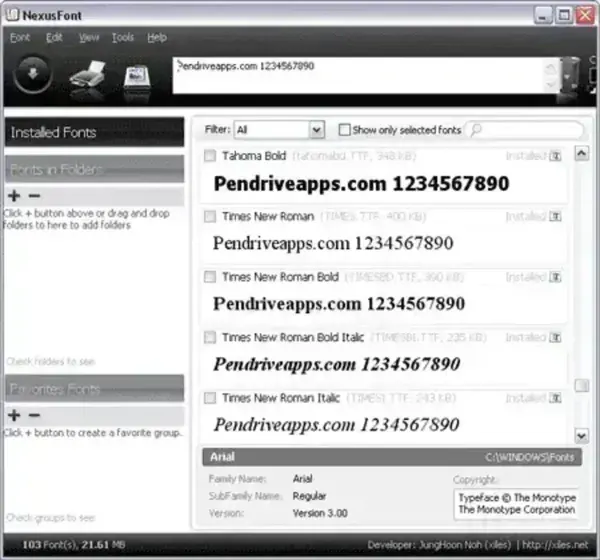
NexusFont can browse both installed typefaces and font files stored in folders. Add a folder to the library to preview its fonts without first installing every file in Windows. While an uninstalled font is loaded in NexusFont, other Windows applications can use it too. When NexusFont closes, fonts that were only loaded temporarily are no longer available to other programs unless you install them.
This temporary loading is useful when comparing typefaces for a design, document, or website mockup. You can review several candidates, decide which ones you need, and avoid permanently installing a large collection just to inspect it.
Organize Collections with Groups, Sets, and Tags
The library can be arranged into groups of folders, while sets let you collect selected fonts from different locations. Tags provide another way to label and filter typefaces. This is useful for organizing collections by project, style, client, or intended use without moving the original font files.
The character map displays the glyphs supported by a selected font, which can help when checking whether a typeface includes the symbols or language characters you need. NexusFont also lets you search for duplicate fonts by comparing file size, font name, and version. Review the results before deleting anything: two similar-looking fonts may be different releases or have different licensing and usage requirements.
Install, Uninstall, and Back Up Fonts
When you decide to use a font permanently, select it and use NexusFont's install command. The program offers different installation options, including copying the font to the Windows Fonts folder or leaving the file in its current location. Installing fonts may require permission to write to a system folder or registry location.
NexusFont can also uninstall selected fonts. Its uninstall options include leaving the font files in place or backing them up, depending on the selected method. Be careful when removing fonts: applications and documents may depend on typefaces that are already installed, and some Windows fonts are protected. Keep original font files and review the install/uninstall log if you need to troubleshoot changes.
Portable Version for a USB Font Library
The developer offers a ZIP version for portable use. Extract NexusFont to a folder on your USB drive and place your font folders on the same drive. Add those folders to a NexusFont library. The developer's guide states that the library and settings are maintained when the USB drive is moved to another computer, even if its drive letter changes.
This makes it convenient to carry a curated font collection between compatible Windows PCs. It does not transfer font usage rights: check each font's license before embedding it in documents, distributing it, sharing the font file, or using it in commercial work.
Version and Compatibility
The developer's website lists NexusFont 2.7.1, released November 25, 2022, with both setup and portable downloads. The publisher describes the program as free for everyone, including use in a company. The project page does not list a newer release, so treat 2.7.1 as the latest version currently documented by the developer rather than assuming that the application is actively updated.
NexusFont Specifications
- Developer: Xiles
- Version: 2.7.1 (November 25, 2022)
- License: Freeware; developer permits personal and company use
- Platform: Windows
- Downloads: Setup and portable ZIP editions
- Font management: Preview, temporary loading, install/uninstall, groups, sets, and tags
- Additional tools: Character map, font search, duplicate finder, and install/uninstall log
- Portable use: Keep the program and font folders together on a USB drive
- Editor's Rating: ★★★★☆ (4/5)
- Official website and download: NexusFont at Xiles
- User guide: NexusFont English help
Is NexusFont Worth Using?
NexusFont is useful for designers and other Windows users who work with many typefaces and want to preview fonts without installing an entire collection. Its groups, sets, tags, character map, and duplicate finder make font libraries easier to organize, while the portable edition is convenient for moving a curated collection between computers. The main considerations are its older 2022 release and the need to manage font licensing separately. For hands-on font browsing and organization, it remains a capable specialist utility.