
Convert is a free Windows unit conversion utility by Joshua Madison. It converts common measurements for distance, temperature, volume, time, speed, mass, power, density, pressure, energy, and more. It also supports user-defined conversions, so you can add conversion factors that are not included in the standard categories.
The developer currently lists Convert version 4.10 as a ZIP download and documents support through Windows 11. The program does not require a conventional installation: extract the archive and run the application. Although it is small and can be carried on removable storage, test it on your own system before relying on it as a portable utility.
Convert - Portable Unit Conversion Tool
What Can Convert Do?
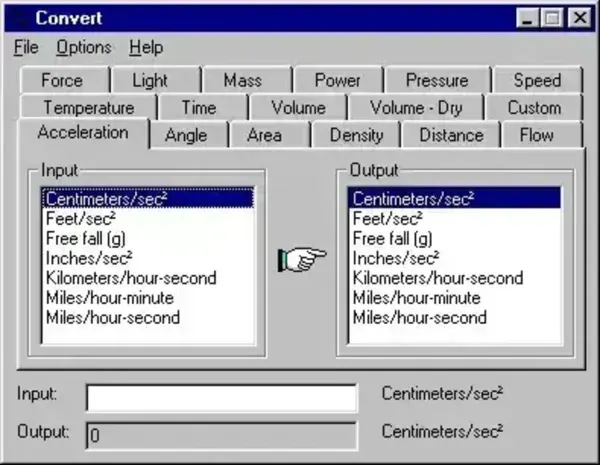
Convert lets you choose a measurement category, select the starting and target units, and enter a value. The result updates as you type, making it useful for quick everyday conversions without opening a spreadsheet or searching the web.
Categories listed by the developer include:
- Distance and length
- Temperature
- Volume
- Time and speed
- Mass and density
- Power and pressure
- Energy and other common measurements
Convert also supports custom conversions. This can be useful when you regularly work with specialized units or a conversion factor that is not included in the standard tabs. Check the developer's FAQ for instructions on creating and organizing custom conversions.
Download Convert for Windows
Download Convert from the developer's official website. The developer lists version 4.10 as a free ZIP download. Review the current download details and operating-system information on that page before using it.
The archive does not use a conventional setup wizard. Extract the files to a folder and launch the executable. The developer's FAQ notes that the program and its required files can be kept together, making it a practical candidate for removable storage. If you want to carry it on a USB drive, test whether its settings and behavior meet your needs on the computers you use.
Windows Compatibility
The developer's page lists support for Windows 95, NT 4, 98, 98SE, ME, 2000, XP, 2003, Vista, Windows 7, Windows 8, and Windows 10, as well as Windows 11. The program is a legacy 32-bit application, so its operation may depend on the Windows environment and any compatibility constraints on a particular PC. Check the official requirements if you are deploying it on a managed or restricted computer.
The developer also notes that Convert can run on Linux or UNIX through Wine, but this is not native Linux support. Results may depend on the operating system and Wine configuration.
Portability and Limitations
Convert is distributed as a ZIP archive rather than a traditional installer, and the developer says it can be run without an installation program. That is useful for a portable-software collection, but a ZIP download alone does not guarantee that every setting remains on the USB drive or that the program leaves no traces on the host computer.
As with any conversion tool, verify results when accuracy is important. Some units depend on context, definitions, or rounding, and custom conversion factors must be entered correctly. Do not use a general-purpose conversion utility as the sole authority for safety-critical, medical, engineering, or regulated calculations.
Convert Details
- Developer: Joshua Madison
- Current listed version: 4.10
- License: Freeware, according to the developer
- Platform: Windows, including Windows 11 as listed by the developer
- Download format: ZIP archive
- Installation: No conventional installer required
- Portability: Suitable to test as a removable-drive utility; verify settings behavior on your system
- Custom conversions: Supported
