
Advanced IP Scanner is a free and portable network scanning utility that quickly analyzes local networks to identify connected devices, open ports, shared folders, and active services. Designed for both home users and IT professionals, this lightweight LAN scanner helps troubleshoot network issues, discover unknown devices, and manage computers remotely without requiring installation.
Because it runs directly from a USB flash drive, Advanced IP Scanner is especially useful for technicians working across multiple systems. Its fast scanning engine provides an instant overview of network activity, making it one of the easiest ways to inspect devices connected to a local network.
Advanced IP Scanner | Portable LAN & Port Scanner
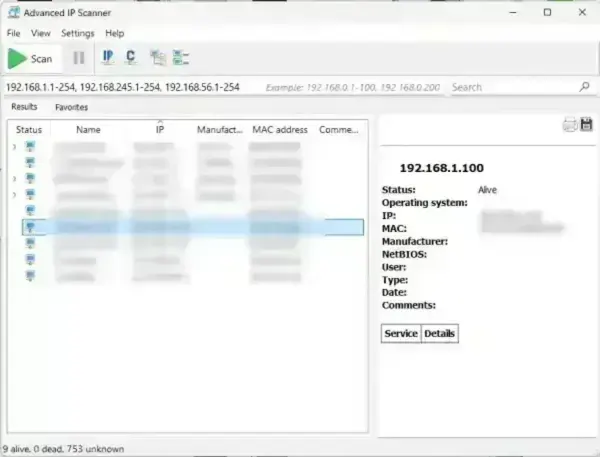
The utility scans IP ranges to detect active devices, retrieve network information, and identify available services. It can display:
- IP addresses
- Hostnames
- MAC addresses
- Device manufacturers
- Shared folders
- HTTP and HTTPS servers
- Open ports and services
Its simple interface and fast performance make it ideal for troubleshooting connectivity issues, auditing devices, and monitoring local network activity.
How Advanced IP Scanner Works
The application works by sending scan requests across a specified IP range to identify active hosts on a local network. Once devices respond, the program gathers available network information including hostname, MAC address, manufacturer details, and accessible services.
Unlike basic ping scanners, Advanced IP Scanner can also:
- Detect shared network folders
- Identify active web servers
- Locate open ports
- Launch remote management tools
- Perform Wake-On-LAN operations
- Remotely shut down compatible systems
The software integrates with Radmin for remote administration features including remote desktop access, file transfer, and telnet connectivity.
Open Port Scanning Features
One of the most useful capabilities of Advanced IP Scanner is its ability to identify active network services and open ports. This helps users:
- Troubleshoot firewall or connectivity issues
- Identify exposed services
- Locate HTTP, HTTPS, FTP, and RDP servers
- Detect misconfigured systems
- Audit devices connected to a LAN
For small office or home networks, this can be especially useful when diagnosing network visibility problems or identifying unknown devices.
Main Features
- Fast LAN Scanning: Quickly detect devices connected to your local network.
- IP & Port Scanning: Scan active IP addresses and identify open ports.
- Device Information: View MAC addresses, hostnames, and manufacturer details.
- Wake-On-LAN: Remotely power on compatible computers.
- Remote Shutdown: Shut down networked systems remotely.
- Shared Folder Detection: Browse available network shares.
- Remote Access Integration: Launch Radmin remote management tools directly.
- Portable Utility: Runs directly from USB without installation.
- Lightweight Interface: Minimal resource usage with fast scan performance.
- Freeware: Free for personal and commercial use.
How to Use Advanced IP Scanner
- Download and launch Advanced IP Scanner.
- Enter the IP range you want to scan or use the automatically detected local subnet.
- Click Scan to begin analyzing the network.
- Review detected devices and network details.
- Right-click a device for additional actions such as Wake-On-LAN, remote shutdown, or opening shared folders.
- Export results for documentation or inventory purposes if needed.
Specifications | Official Site | Download
- File Size: 20 MB
- Developer: Famatech Corp.
- Official Website: Project Page
- License: Freeware
- Supported Operating Systems: Windows 11, Windows 10, Windows 8, Windows 7
- Portable: Yes
- Rating: 4 Star
- Category: Network Utilities
- Download: Advanced IP Scanner Download
Final Thoughts
Advanced IP Scanner is a fast, lightweight, and highly practical LAN scanning utility for discovering devices, checking open ports, and troubleshooting local networks. Its portable design, remote management features, and simple interface make it useful for both casual users and professional technicians.
Whether you need to locate devices on a network, identify shared resources, or remotely manage computers, Advanced IP Scanner remains one of the most convenient freeware tools available for portable network diagnostics and administration.
