
ExifDataView is a free portable EXIF metadata viewer developed by NirSoft. It allows you to quickly view detailed EXIF information stored inside digital images, including modern formats such as WEBP. This lightweight utility displays technical photo data such as camera manufacturer, camera model, date and time the picture was taken, GPS location, ISO speed, exposure time, and much more.
In addition to its graphical interface, ExifDataView also supports command line options, making it useful for scripting, automation, and batch processing tasks. Because it is fully portable, it can be run directly from a USB flash drive without installation.
View EXIF Metadata | ExifDataView Portable
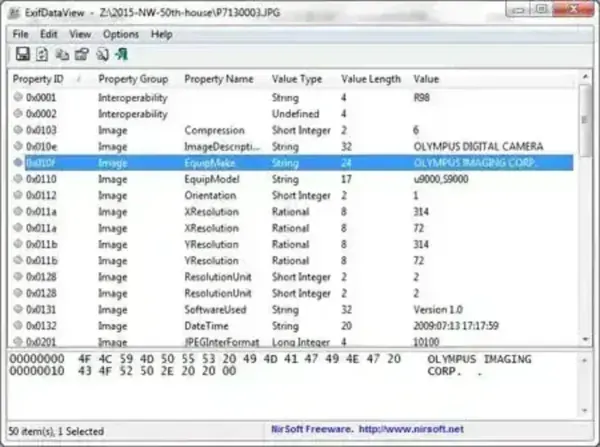
ExifDataView focuses on one thing and does it well: displaying image metadata in a clean, readable table. Unlike heavier photo management tools, it launches instantly and consumes very little system resources, making it ideal for quick inspections.
This portable EXIF metadata tool is particularly useful for photographers, web developers, forensic analysts, and privacy conscious users who want to inspect embedded image data before sharing photos online.
Key Features of ExifDataView
- View EXIF metadata: Displays camera make, model, shutter speed, aperture, ISO, focal length, and capture date.
- GPS location support: Shows embedded latitude and longitude data when available.
- WEBP support: Can read EXIF data stored inside modern WEBP image files.
- Command line support: Allows automation and batch metadata inspection.
- Multiple file loading: View EXIF information from many images at once.
- Extremely lightweight: Small footprint and fast startup.
Common Use Cases
- Photo inspection: Quickly check camera and exposure details.
- Privacy auditing: Identify GPS or identifying data before sharing images.
- Digital forensics: Examine image metadata during investigations.
- Web optimization: Verify image metadata for uploaded website assets.
Specifications & Downloading
- Author's Website: Official Project Page
- Developer: Nir Sofer (NirSoft)
- Extracted Size: 96 KB
- License: Freeware
- Supported OS: Windows
- Download: Grab this portable EXIF viewer
ExifDataView Download
Frequently Asked Questions (FAQ)
Is ExifDataView portable?
Yes, it does not require installation and can be run directly from a USB flash drive.
Can ExifDataView edit EXIF data?
No, it is a read-only tool designed specifically for viewing EXIF metadata.
Does ExifDataView support GPS metadata?
Yes. If GPS data is present, latitude and longitude information will be displayed.
What image formats are supported?
It supports JPEG and WEBP files, among others that contain standard EXIF metadata.
Is ExifDataView safe to use?
Yes. It is a trusted NirSoft utility and does not modify image files.
Final Thoughts
ExifDataView is an excellent choice if you need a fast, no nonsense way to view image metadata. Its tiny file size, command line support, and portability make it especially useful for technicians and advanced users.
For users who need advanced editing or batch modification of metadata, more powerful tools may be required. However, for simple inspection and analysis, this tool remains one of the best lightweight EXIF viewers available.
