
FreeFileSync is a free and open source file and folder synchronization tool for Windows. It works by first comparing files and directories, then synchronizing differences based on file size, timestamps, or actual file content. This makes it ideal for keeping folders mirrored, creating backups, and maintaining consistent data across multiple locations.
Unlike most simple copy utilities, it is designed to handle large datasets efficiently, supports files larger than 4 GB, and allows batch processing and automation for recurring synchronization tasks. Its portable availability also makes it well suited for USB based toolkits and on demand use.
FreeFileSync | File and Folder Synchronization Tool
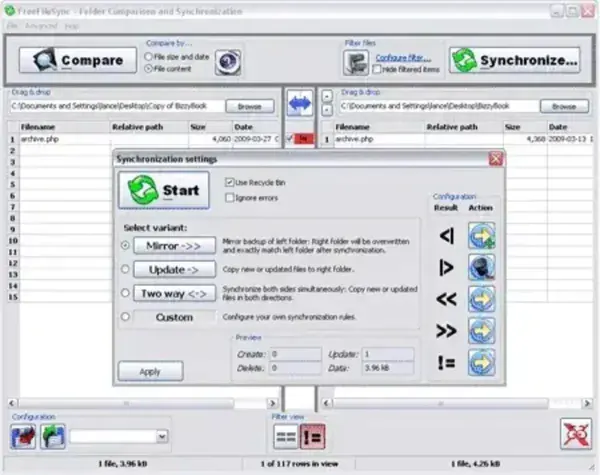
FreeFileSync features a clean and easy to understand graphical interface that allows users to configure synchronization jobs in seconds. Folder pairs are displayed clearly, differences are previewed before syncing, and actions can be reviewed to prevent accidental data loss.
File Comparison vs File Synchronization
FreeFileSync uses file comparison as the foundation of every synchronization task. Before any files are copied, updated, or deleted, the tool analyzes differences between folders. Once differences are identified, synchronization rules determine how those changes are applied. This approach ensures accuracy and gives users full control over how files are kept in sync.
Features
- File and Folder Synchronization: Compare and synchronize files and directories to ensure both locations contain the same data.
- Multiple Synchronization Modes: Supports two way sync, mirror sync, update sync, and fully customizable rules.
- File Comparison Methods: Detects changes using file size, timestamps, or full binary file comparison.
- Backup Capabilities: Configure one way synchronization to create reliable file backups.
- Filters and Exclusions: Include or exclude specific files, folders, or extensions during synchronization.
- Real Time Synchronization: Monitor folders and automatically trigger sync operations when changes occur.
- Batch Processing: Save synchronization jobs and run them manually or automatically.
- Scripting Support: Automate synchronization tasks using scripts for advanced workflows.
- Large File Support: Handles files larger than 4 GB without issues.
- Fast and Efficient: Optimized algorithms ensure quick comparison and high performance syncing.
- Open Source: Released under the GNU General Public License, allowing transparency and community contributions.
- Portable Availability: Can be used as a standalone portable application without installation.
Why Use FreeFileSync Portable?
The portable version of FreeFileSync is especially useful for technicians and power users who need a dependable file synchronization tool without installing software on every system.
- No registry changes or system installation
- Ideal for USB drives and external storage
- Works on locked down or shared computers
- Consistent behavior across multiple Windows systems
Specifications | Official Site | Download Link
- Author's Website: Project Page
- License: Open Source (GPL)
- Supported OS: Windows
- Download: You can get this free file synchronization and comparison tool here:
FreeFileSync Download
Final Thoughts
FreeFileSync is a reliable and well designed solution for file and folder synchronization. Its combination of accurate file comparison, flexible synchronization modes, automation support, and portable use makes it an excellent choice for backups, mirroring folders, and maintaining consistent data across systems.
For users looking for a free, open source, and USB friendly file synchronization tool, this file merger software like Winmerge another popular file comparing tool, remains one of the most practical and efficient options available.