Trend Micro HouseCall: Free On-Demand Malware Scanner
Trend Micro HouseCall is a free, on-demand security scanner for Windows. It checks a computer for viruses, spyware, and other malware, then provides options for handling detected threats. HouseCall is useful as a second-opinion scan alongside an installed security product, but it does not replace real-time antivirus protection. Although its launcher can be saved and started when needed, HouseCall downloads scanning components and threat data, so it is not a self-contained offline antivirus package that can simply be copied to a USB drive.
Trend Micro HouseCall: Free On-Demand Malware Scanner
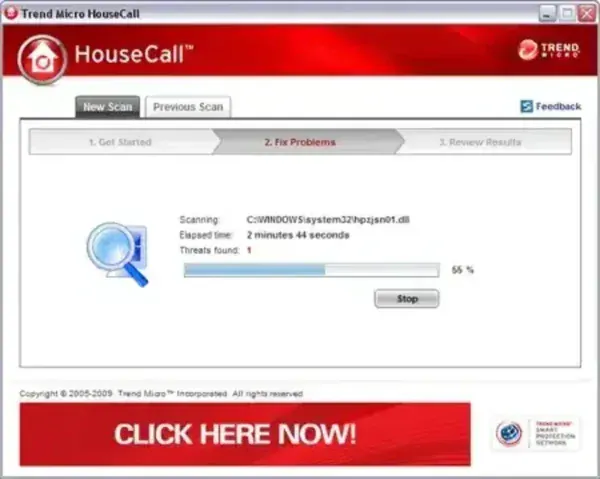
What HouseCall Can Do
HouseCall provides a separate scan when you want to check a Windows PC for malicious software. Trend Micro documents quick and full scans, along with custom scan options. The scan uses downloaded components and current threat information, allowing it to work alongside an existing antivirus product without requiring you to remove that protection.
- On-demand scanning: Run a scan when you suspect a problem or want a second opinion.
- Quick scan: Check important system areas where active threats are commonly found.
- Full scan: Examine the computer more comprehensively. This can take considerably longer.
- Custom scan: Select specific folders to examine.
- Threat cleanup: Review detected threats and the available cleanup actions.
- Works alongside antivirus: HouseCall is designed to complement, not replace, real-time security software.
Is HouseCall Portable?
HouseCall is browser-independent and uses a small launcher. You can save the launcher and run it again when you need another scan, but it downloads the scanning engine, configuration, and pattern files required for operation. It therefore needs an internet connection and should not be described as a fully self-contained offline scanner. Saving the launcher on a USB drive may be convenient, but it does not guarantee that the complete scanning environment is stored on that drive.
How to Run a Scan
- Visit Trend Micro's official HouseCall page and download the Windows launcher.
- Start the launcher and allow the required components to download.
- Choose a quick, full, or custom scan, depending on what you need to check.
- Wait for the scan to finish and review the detected items.
- Read the recommended action for each detection before allowing cleanup, especially if the item belongs to software you recognize.
Keep your regular security software enabled. HouseCall is an additional on-demand check, not continuous protection.
HouseCall Specifications and Download
- Developer: Trend Micro
- License: Freeware
- Platform: Windows
- Internet access: Required to obtain current scanning components and threat information
- Scan types: Quick, full, and custom
- Deployment: Downloadable launcher; not a self-contained offline scanner
- Editor's Rating: ★★★★☆ (4/5)
- Official project page and download: Trend Micro HouseCall
Frequently Asked Questions
Is Trend Micro HouseCall free?
Yes. Trend Micro offers HouseCall as a free on-demand scanner. It is intended as an additional check rather than a replacement for an installed security suite.
Does HouseCall replace antivirus software?
No. HouseCall runs scans when you launch it, but it does not provide the continuous real-time protection of a full antivirus product. Keep your primary security software enabled and updated.
Can HouseCall scan a computer without an internet connection?
No. The launcher downloads the scanning components and current threat information needed to perform a scan. It is not a fully offline scanner that carries all definitions and engines in a USB folder.
Can I keep the HouseCall launcher on a USB drive?
You can save the launcher on removable storage, but it still downloads the components required for a scan. Keeping the launcher on a USB drive does not make the full scanning environment portable or offline.
What should I do if HouseCall detects a file I recognize?
Review the detection details and the recommended action before allowing cleanup. If you believe a legitimate file was flagged incorrectly, check the result with the software publisher or Trend Micro support rather than immediately deleting it.
Is HouseCall Worth Using?
HouseCall is useful when you want a second opinion on a Windows computer without replacing your existing antivirus software. Its quick, full, and custom scan options provide a straightforward way to check for malware, and the launcher can be saved for later use. Its main limitation is that it requires an internet connection to download the current scanning components, so it is not a complete offline USB rescue tool. Use the official download, keep your regular security protection active, and review detections before cleanup.