
HD Speed is a free and portable drive speed testing utility designed to measure the read performance of storage devices such as hard drives, solid state drives, optical discs, and even legacy floppy disks. It allows users to test both burst speed and sustained transfer rates, making it useful for diagnosing slow drives, verifying upgrades, or benchmarking older hardware.
HD Speed Portable Drive Speed Tester
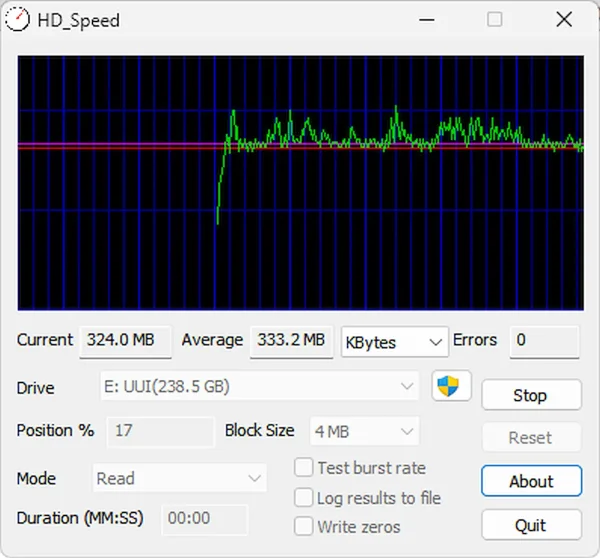
HD_Speed runs without installation and can be launched directly from a USB flash drive. This makes it an excellent utility for technicians, system builders, or users who need a quick way to test drive performance across multiple computers. The interface is lightweight, straightforward, and focused entirely on read speed testing without unnecessary extras.
What HD Speed Can Test
HD Speed supports a wide range of storage devices, including both modern and legacy hardware:
- Hard disk drives (HDD)
- Solid state drives (SSD)
- USB flash drives and external hard drives
- CD and DVD ROM drives
- Floppy disk drives
This broad compatibility makes it especially useful when working with older systems or mixed hardware environments.
Key Features
- Burst and sustained speed testing: Measures peak and continuous read performance.
- Real time speed graph: Displays read speed changes visually during testing.
- Wide device support: Works with HDDs, SSDs, optical drives, USB devices, and floppies.
- Portable application: No installation required, ideal for USB toolkits.
- Lightweight interface: Fast startup and minimal system impact.
- Legacy friendly: Works well on older versions of Windows.
Common Use Cases
HD Speed is best suited for quick diagnostics and basic benchmarking tasks such as:
- Testing old drives to determine usability or potential failure
- Comparing performance between internal and external drives
- Verifying read speeds after disk cloning or imaging
- Identifying slow optical media or failing discs
- Checking USB flash drive performance
While it does not offer advanced analytics or write testing, it excels at fast, no nonsense read speed checks.
How to Use HD Speed
- Download and extract the HD Speed ZIP file.
- Run HD_Speed.exe.
- Select the drive you want to test from the dropdown list.
- Click "Start" to begin the speed test.
- View the live graph and reported transfer rates.
Tip: For the most accurate results, avoid running other programs that access the drive while testing.
Specifications and Download
- Official Website: SteelBytes Project Page
- License: Freeware
- Extracted Size: Under 1 MB
- Supported Operating Systems: Windows XP, Vista, 7, 8, 10, 11
- Category: Disk Utilities
- Editor's Rating: ★★★☆☆
- Download: Download HD_Speed
Final Thoughts
HD Speed is not a modern all in one benchmarking suite, but I feel it remains a reliable and lightweight drive speed tester for quick diagnostics. Its portability, simplicity, and wide hardware support make it especially useful for older systems, legacy drives, or technician USB toolkits. It's simple and just works!
For users who need fast read speed verification without installing software or dealing with complex interfaces, HD_Speed still delivers exactly what it promises.
