Dr.Web CureIt!: Standalone On-Demand Malware Scanner
Dr.Web CureIt! is a standalone Windows malware scanner from Doctor Web. It is designed for on-demand scanning and removal of malware on a computer that may already be infected. The free edition is available for home use, while business use requires a commercial license. Each download includes the latest virus definitions available at request time, but the utility does not update itself automatically. Download a fresh copy before each scan.
Dr.Web CureIt!: Standalone Malware Scanner
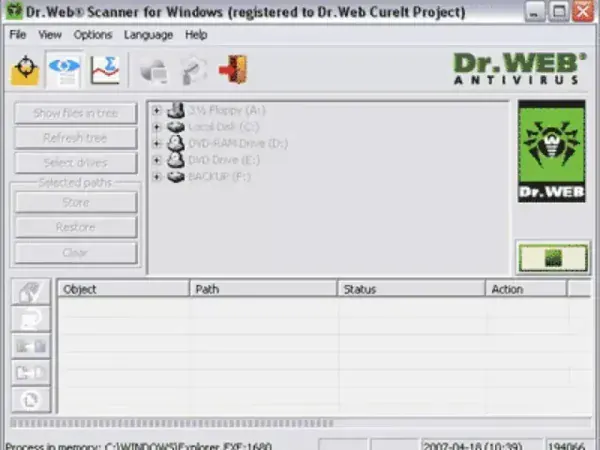
Unlike a traditional antivirus suite, Dr.Web CureIt! is not designed to provide continuous real-time protection. It is a second-opinion scanner that can be launched when you suspect an infection, want to check a computer after an incident, or need an additional malware-removal tool. It can be saved to a local folder or USB drive and run without a conventional installation.
What Dr.Web CureIt! Does
- On-demand scanning: Scan a Windows computer for viruses, trojans, spyware, adware, rootkits, and other detected threats.
- Malware removal: Offer neutralization actions for detected objects, including curing or moving threats to quarantine where supported.
- Current definitions at download: The copy downloaded from Doctor Web's website includes the latest available virus definitions at the time it is built.
- Standalone operation: Run the downloaded executable without installing a full antivirus suite.
- Portable storage: Keep a copy on a USB drive and launch it on a compatible Windows computer.
- Quarantine: Use the quarantine function available in the current free edition to isolate detected objects.
- Multiple languages: The utility selects a supported interface language based on Windows settings.
The free edition has fewer controls than Dr.Web CureIt! Pro. Doctor Web's comparison page states that the free version does not allow users to select arbitrary scan objects, while the Pro edition adds custom scan targets, exclusions, command-line parameters, and advanced quarantine management. Do not assume the free edition offers every option shown in Pro demonstrations.
Download a Fresh Copy Before Scanning
Dr.Web CureIt! does not have an automatic database update function. Doctor Web says its virus databases are updated hourly or even more frequently, and a downloaded copy only contains the definitions available when it was built. If you keep an old executable on a USB drive, it may have outdated detection data. Download a new copy from the official website before each use.
- Open the official Dr.Web CureIt! download page from a computer with internet access.
- Review the current license and privacy terms for the free home-use edition.
- Complete the download request form. The current free download process asks for contact details and agreement to send scan statistics and system information to Doctor Web.
- Save the downloaded executable to a local folder or USB drive.
- Launch the utility on the Windows computer you want to check and follow the scan prompts.
- Review the detection results and the proposed actions before allowing the program to cure, move, or remove files.
- Restart Windows if the utility requests it, then download a fresh copy before a later scan.
Because the free download process includes a statistics-consent step, it is not an anonymous download. Doctor Web describes the transmitted information as system and scan statistics such as CPU, RAM, Windows version, installed security software, and threat-detection results, and says it does not collect personal information that identifies the user. Review the current privacy notice before accepting the request.
Use It Alongside, Not Instead of, Real-Time Protection
CureIt! is intended for a one-time scan and cleanup. It does not monitor files continuously, block threats as they arrive, or keep its definitions current in the background. Use a maintained antivirus or endpoint protection product for ongoing security, and treat CureIt! as an additional scanner when you need a second opinion.
If the computer is severely infected or Windows cannot start normally, a standalone scanner may not be enough. Doctor Web also provides a separate LiveDisk recovery environment for supported cases. Do not assume that CureIt! can repair every infection or restore damaged Windows components.
Free Home Use and Business Licensing
Doctor Web offers the standard CureIt! download free for home use. The company directs businesses and users who provide malware-removal services to purchase a license. The free download request also includes a statistics-consent step. If you are scanning a company-owned computer, use a product and license approved by the organization's IT or security team rather than assuming the home-use terms apply.
Dr.Web CureIt! Specifications
- Application: Dr.Web CureIt!
- Developer: Doctor Web
- Version: The downloaded executable is rebuilt with current virus definitions; a fixed version number is not prominently listed on the download page
- License: Free for home use; business use requires a commercial license
- Platform: Windows; check the current download page for supported Windows versions and architecture
- Primary functions: On-demand malware scanning, threat neutralization, quarantine, and scan reporting
- Update method: No automatic database updates; download a fresh executable before each scan
- Deployment: Standalone executable; can be stored and run from a USB drive
- Limitations: No real-time protection; free edition does not provide the Pro version's custom scan-object selection or command-line automation
- Editor's Rating: ★★★★☆ (4/5) as an on-demand second-opinion scanner
- Official download: Dr.Web CureIt! free home-use download
- Product overview: Dr.Web CureIt! features and instructions
- Free vs. Pro comparison: Dr.Web CureIt! Pro feature comparison
- Statistics collection: What scan and system statistics are transmitted
- Alternative recovery environment: Dr.Web LiveDisk
Frequently Asked Questions
Is Dr.Web CureIt! free?
The standard CureIt! scanner is free for home use. Doctor Web requires a commercial license for business use and for providing malware-removal services to other users.
Does Dr.Web CureIt! provide real-time protection?
No. It is an on-demand scanner for manual checks and cleanup. Use a maintained antivirus or endpoint protection product for continuous protection.
Does CureIt! update its virus definitions automatically?
No. The downloaded executable contains the definitions available when it was built. Doctor Web updates its databases frequently, so download a fresh copy before each scan.
Can I run Dr.Web CureIt! from a USB drive?
Yes. The standalone executable can be saved to a USB drive and launched on a compatible Windows computer. The USB copy should be refreshed from the official site before use so it has current definitions.
Can the free version scan a selected folder or drive?
The current feature comparison says the free edition does not provide the Pro version's custom scan-object selection. Check the current interface and product comparison if you need a targeted scan.
Does the free download collect information?
The current download form asks users to agree to send scanning statistics and system information to Doctor Web. The company lists examples such as CPU, RAM, Windows version, installed security software, and threat-detection results, and says the data does not include personal information that identifies the user. Review the privacy notice before consenting.
Can Dr.Web CureIt! replace my antivirus program?
No. It does not provide real-time protection or automatic database updates. It is intended as an additional on-demand scanner, not a replacement for a maintained antivirus product.
Is Dr.Web CureIt! Worth Using?
Dr.Web CureIt! remains useful as a standalone second-opinion scanner for home Windows users who need an additional malware check. Its main advantages are that it can run without a conventional installation and uses current definitions when freshly downloaded. The important trade-offs are the lack of automatic updates and real-time protection, the home-use-only free license, and the statistics-consent step in the download process. Keep a maintained antivirus product for ongoing protection and refresh the CureIt! executable before every scan.