
Convert PDF to Word Documents; First PDF is a Free PDF to Word Converter-style desktop tool designed to help you convert PDF files into editable Word documents or plain text files. This utility focuses on simplicity, allowing users to quickly extract content from PDFs without relying on online services or cloud-based converters.
Simply select the PDF file you want to convert, choose whether to output the file as a Word document or a text file, select a destination folder, and click Go. The conversion process runs locally on your computer, making it suitable for users who prefer an offline PDF to Word conversion workflow.
Created by Sautin Soft, First PDF provides a straightforward solution for converting PDF documents into editable formats, particularly for users who need a lightweight desktop-based converter rather than an online tool.
Easily Convert PDF to Word Documents Offline
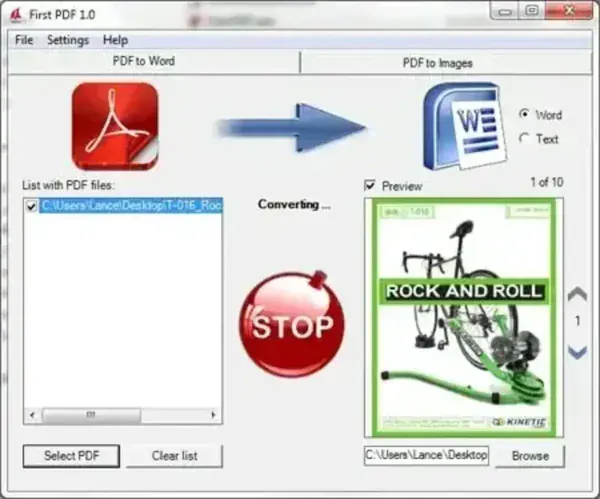
First PDF is designed for users who need to convert PDF files into Microsoft Word documents without complex settings or advanced configuration. It supports basic PDF-to-Word and PDF-to-Text conversions and is well suited for occasional document editing tasks.
Unlike many internet browser based PDF converters, First PDF runs as a Windows application, meaning files are processed locally rather than uploaded to external servers. This can be beneficial when working with sensitive documents or in environments with limited Internet access.
Key Features
- Converts PDF files to Word documents or plain text
- Simple, beginner-friendly interface
- Desktop-based conversion (no browser required)
- Quick setup and easy operation
- Suitable for basic document editing needs
Software Details
- Author's Website: Archived Page (No longer in production)
- Extracted Size: 6.45 MB
- License:
Freeware(Now Trialware)
Note: While First PDF was previously offered as freeware, it now appears to operate as a trial version with limitations. Users looking for a completely free PDF to Word converter may wish to review the trial restrictions before relying on it for regular use.
Running First PDF from a USB Drive
It's made available as a Windows Installer file, if you don't want to install the product on a PC at all;
- Download First PDF and extract the setup file from the zipped archive.
- Then, using 7-Zip, Extract the contents of Setup.exe to a directory on your USB Drive.
- Finally, launch First PDF.exe from the directory on your USB Drive.
Final Take on this Free Offline PDF Converter Tool
First PDF offers a simple desktop based approach to converting PDF documents into editable Word or text files. Its ease of use makes it appealing for quick, occasional conversions, especially for users who prefer offline tools over online PDF converters.
However, since the software is no longer fully free, it may be better suited for testing or light usage rather than long term document conversion needs.