
Royal RSS Reader is, as the name suggests, a simple and portable RSS feed reader. This lightweight tool can be used to manage and read posts from Really Simple Syndication feeds while keeping everything fully portable. Because it requires no installation, you can run it directly from a USB flash drive, portable SSD, or cloud synced folder. It is a great option for users who want a fast, minimalist, and clutter free way to keep up with news and blog updates.
This RSS Reader provides an easy, straightforward interface that focuses on speed and simplicity. You can subscribe to feeds using drag and drop by dropping a feed icon or URL into the application, or by manually entering a feed address. It supports quick feed searching, marking feeds as read, and adjusting feed refresh intervals so you receive updates exactly as often as you want. For reporting or offline reading, it can also save feeds to an HTML file.
Royal RSS Reader
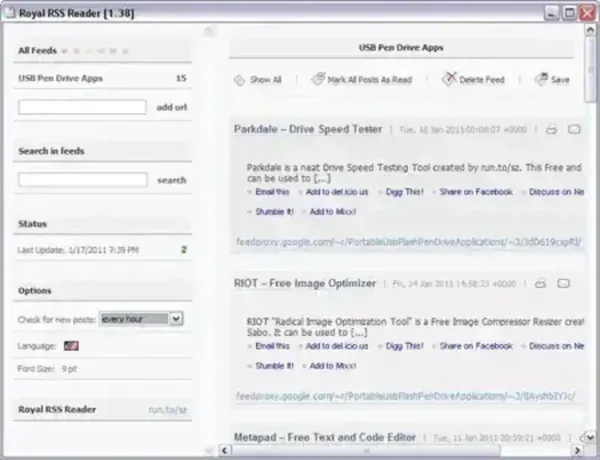
Features of Royal RSS Reader
- Runs fully portable with no installation required
- Drag and drop feed icons or URLs directly into the reader
- Manually enter feed URLs for custom subscriptions
- Search quickly within your subscribed feeds
- Set the frequency for feed checking and updates
- Minimizes to the Windows taskbar for easy access
- Mark feeds as read or view all feeds at once
- Save feed content to HTML for offline use
- Extremely lightweight at only 320 KB
Why Use a Portable RSS Feed Reader?
A portable RSS reader is ideal for users who want to take their feed subscriptions and settings with them from one computer to another. Because Royal RSS Reader stores all configuration files inside its own folder, it works well on shared PCs, secure systems where software installation isn't allowed, or for users who frequently switch machines. Its simplicity and extremely small size make it an excellent choice for anyone who wants a no-frills, fast-loading RSS feed reader.
Royal RSS Reader Specs | Official Site | Download Link
- Author's Website: Project Page
- Developer: Written by run.to/sz
- Supported OS: Windows
- File Size: 320 KB (very small footprint)
- License: Freeware
- Downloading: You can grab this portable RSS feed reader here:
Royal RSS Reader Download
