
Reveal Password: Free portable password unmasking utility that displays passwords hidden behind asterisks in Windows applications. It works by converting password-style text fields into normal text boxes, allowing users to view hidden characters instantly.
This lightweight Windows utility uncovers passwords masked with asterisks, making it useful for recovering forgotten entries or testing password field security.
Reveal Password | Portable Password Unmasking Tool
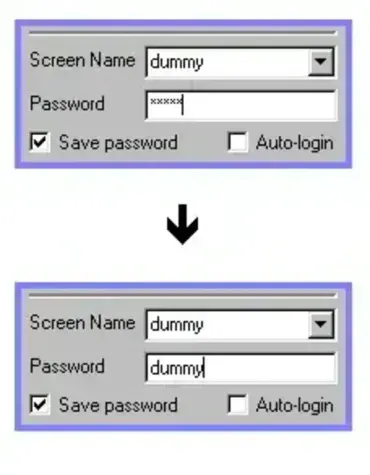
This portable utility scans open Windows applications for password-style text fields and removes the masking characters so the underlying text becomes visible.
It is commonly used to reveal saved passwords hidden behind stars in older Windows applications, email clients, and login dialogs.
Why Use Reveal Password?
Passwords are typically hidden with asterisks or dots to prevent others from viewing sensitive information on screen. However, users sometimes need to verify what was entered, recover a forgotten password, or test how applications handle password masking.
This utility provides a fast and portable way to display hidden password fields without installing additional software or modifying system files.
How It Works
The application searches for Windows text boxes using the standard password field style. When detected, it sends a Windows message instructing the control to display the actual text instead of masking characters.
- Scans open application windows
- Detects password style text boxes
- Removes masking characters such as asterisks
- Displays the hidden text as plain text
How to UnMask Passwords
- Download and extract the utility.
- Run the executable directly. No installation is required.
- Open the application containing the hidden password field.
- The tool automatically scans for password boxes.
- Hidden passwords appear as readable text when supported.
Common Use Cases
- Recovering forgotten passwords already entered into applications
- Viewing saved Outlook or email account passwords
- Testing password masking behavior in Windows programs
- Auditing application security during software testing
- Checking saved credentials before changing passwords
Key Features
- Reveals passwords hidden behind asterisks or dots
- Portable standalone application
- No installation required
- Small and lightweight
- Easy to use interface
- Works with many standard Windows password fields
Important Limitations
Not all applications store actual passwords inside visible password fields. Many modern programs use protected controls or placeholder characters instead of the real password text.
Because of this, the utility works best with older or standard Windows password boxes and may not reveal credentials from modern browsers or heavily secured applications.
Security and Privacy Note
Only use this tool on systems and accounts you own or are authorized to test. Revealing passwords without permission may violate privacy policies, workplace rules, or local laws.
Specifications | Official Site | Download
- Author Website: Official Project Page
- Developer: Scott
- License: Freeware
- Platform: Windows
- Portable: Yes
- Download: Download Reveal Password (ZIP)
Final Thoughts
Reveal Password remains a simple and effective portable utility for viewing passwords hidden behind asterisks in supported Windows applications. Its lightweight design and portable nature make it especially useful for troubleshooting, password verification, and software testing to unmask passwords on systems where traditional password fields are still used.
